

这是一个创建于 696 天前的主题,其中的信息可能已经有所发展或是发生改变。
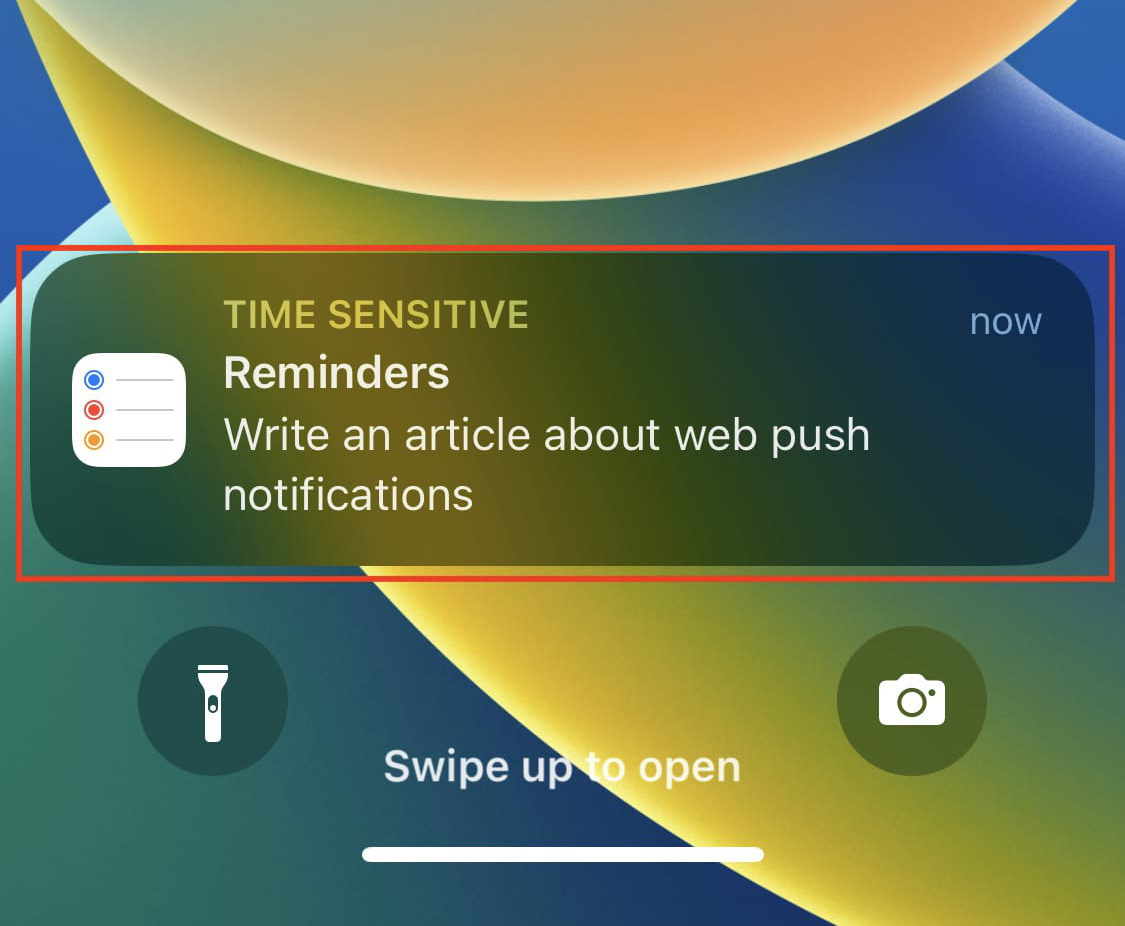
目前用的方案是:Service Worker API
代码是参考这篇文章: https://tahazsh.com/blog/web-push-notifications 在浏览器上可以正常推送,但是在苹果手机 Safari 上没有任何反应 T.T
下面是代码:
export default defineNuxtPlugin(async () => { let registration const defaultNotification = { title: 'iNotify !', body: 'You have a new message.', openurl: '' } function NotifyToServer(config) { if (config) this.init(config) } NotifyToServer.prototype = { init(config) { if (!config) cOnfig= {} this.key = config.key || 'BDQXntRO2oL7cnk3-CC30T4anHw2D-UGFz8UrzjtuxUKVy9dD3nqxRyxnZSM-ssY1wk976yw945mnmayW1_zyks' this.title = config.title || document.title // 标题 this.notification = config.notification || defaultNotification this.onLoadApp() return this }, async onLoadApp() { // 测试密钥 https://web-push-codelab.glitch.me/ const YOUR_PUBLIC_KEY = this.key console.log(' ~ file: serverNotify.client.js:27 ~ onLoadApp ~ YOUR_PUBLIC_KEY:', YOUR_PUBLIC_KEY) // 这里为 false if ('serviceWorker' in navigator && 'PushManager' in window) { // 激活 serviceWorker registration = await navigator.serviceWorker.register('./sw.js') console.log(' ~ file: serverNotify.client.js:30 ~ onLoadApp ~ registration:', registration) const permissiOnResult= await Notification.requestPermission() console.log(' ~ file: serverNotify.client.js:33 ~ onLoadApp ~ permissionResult:', permissionResult) if (permissionResult !== 'granted') return try { // service worker 处于激活状态时,可以使用 PushManager.subscribe() 来订阅推送通知 const pushSubscription = await registration.pushManager.subscribe({ userVisibleOnly: true, // https://developer.mozilla.org/zh-CN/docs/Web/API/PushManager/subscribe 由服务端生成密钥 applicationServerKey: YOUR_PUBLIC_KEY }) // 端点及发送数据需要的加密密钥 console.log('用户已订阅推送通知 pushSubscription', JSON.stringify(pushSubscription)) // 例如显示一条通知 // registration.showNotification('订阅成功') } catch (err) { console.log('用户拒绝了推送通知', err) } return this } }, send(json) { // const title = json.title || this.title // // 例如显示一条通知 // registration.showNotification(title, json) navigator.serviceWorker.ready.then(registration => { registration.pushManager.getSubscription().then(subscription => { console.log(`=====>subscription`, subscription) if (subscription) { const title = json.title || this.title // 例如显示一条通知 registration.showNotification(title, json) // 使用获取到的订阅信息模拟一个 push 事件 } else console.log('无法获取订阅信息') }).catch(error => { console.log('获取订阅信息失败: ', error) }) }) } } const iNotifyToServer = new NotifyToServer({ }) return { provide: { iNotifyToServer } } }) 16 条回复
 | 1 sentinelK 2024 年 5 月 28 日 没太懂楼主的需求,楼主是想实现截图中的效果,还是简单的 webpush ? 这是完全两个技术路线和逻辑实现。 截图中的是 iOS 原生推送。楼主代码实现的是 web 推送。 |
 | 2 okakuyang 2024 年 5 月 28 日 via iPhone 苹果的是自己的一套,你要去看苹果关于浏览器推送的文档 ,你网上随便抄一篇大概率是失败,因为苹果不是谷歌 chrome 那套 api 。要看你 h5 是运行在自己的 app 里还是别人的 app 里,自己的 app 就自己加原生的推送,别人的 app 你大概率是做不了任何事情。设想一下打开一个 app ,被这个 app 的三方网页添加了一堆推送,这概率极低。 |
 | 3 kdwnil 2024 年 5 月 28 日 要用 safari 的 APNs 需要将网页添加到主屏幕 |
 | 4 liuchengfeng1 OP @sentinelK 就是 webpush ,截图意思是想实现这种效果 |
| 5 liuchengfeng1 OP @okakuyang 就是自己的 APP |
 | 6 h3ejkuXr64B1T2Uj 2024 年 5 月 28 日 我最近做过类似的打包 H5 的 app 实现原生推送功能,用的 expo ,流程比较简单 参考 https://expo.dev/notifications |
 | 7 dingdangnao 2024 年 5 月 28 日 用 Bark 凑合凑合得了 |
 | 8 MossFox 2024 年 5 月 28 日 Safari 的 Web Push 需要作为 PWA 应用添加到主屏幕、并且确保点进去是全屏幕运行的那种才可以使用。 |
 | 9 coolcoffee 2024 年 5 月 28 日 自己的应用难道不应该直接写一个 js bridge ,通过网页调用 iOS native 的能力来获取到设备推送 token 吗? |
| 10 liuchengfeng1 OP @0xCyan 大佬能细说一下吗,具体怎么操作,感觉接近了 |
| 11 liuchengfeng1 OP 用了一个 MagicBell ,看 demo 也能实现在 safari 浏览器中进行推送。地址是: https://webpushtest.com/ |
| 12 h3ejkuXr64B1T2Uj 2024 年 5 月 28 日 |
 | 13 ColdBird 2024 年 5 月 28 日 webpush 这套方案本身就是 google 家的,是基于 Web Push Protocol 做的上层实现,在 IOS 不好用很正常。从你的需求来说,应该用 IOS 提供的 H5 方案,如果 IOS 没有提供方案,应该自己在壳(即 IOS app )上通过 bridge 提供推送注册能力给 h5 ,h5 注册之后 IOS 来完成推送 |
 | 14 jiahailiang22 2024 年 5 月 28 日 挺简单啊 wkwebview 代理方式 调用原生 push 即可 app 壳子里边儿 写推送实现代码,搜索 WKwebview 与 ios 原生交互 |
| 15 liuchengfeng1 OP @0xCyan 大佬有 github demo 吗想直接运行看一下效果 |
| 16 liuchengfeng1 OP 找到了一个非常好的 DEMO: https://github.com/andreinwald/webpush-ios-example/tree/main |
 Select Language