

前言
说来也巧,最近在研究 Passkey ,本来思前想后是不写这篇文章的(因为懒),但是昨天刷知乎的时候发现廖雪峰廖老师也在研究 Passkey ,想了想还是写一篇蹭蹭热度吧。
了解 Passkey
要了解 Passkey ,我们首先需要了解 Web Authentication credential ( Web 认证凭据),简而言之,Web 认证凭据是一种使用非对称加密代替密码或 SMS 短信在网站上注册、登录、双因素验证的方式。通过操作系统-用户代理(浏览器)-服务器三方的交互,我们得以以无密码的方式完成对指定服务的身份鉴权。Web 认证凭据目前呗广泛使用在双因素认证( 2FA )中。
Passkey 则是一种特殊的 Web 认证凭据:与传统的 Web 认证凭据不同,Passkey 可用于同时识别和验证用户,而前者只能用于验证用户信息,不能用来识别用户,这得益于 Passkey 的可发现性( Discoverable )。
通过 Passkey ,我们可以通过使用操作系统的生物验证方式(例如 Windows Hello ,FaceID )完成对指定站点的登录,而不必繁琐的输入账号和密码,解放用户的双手。
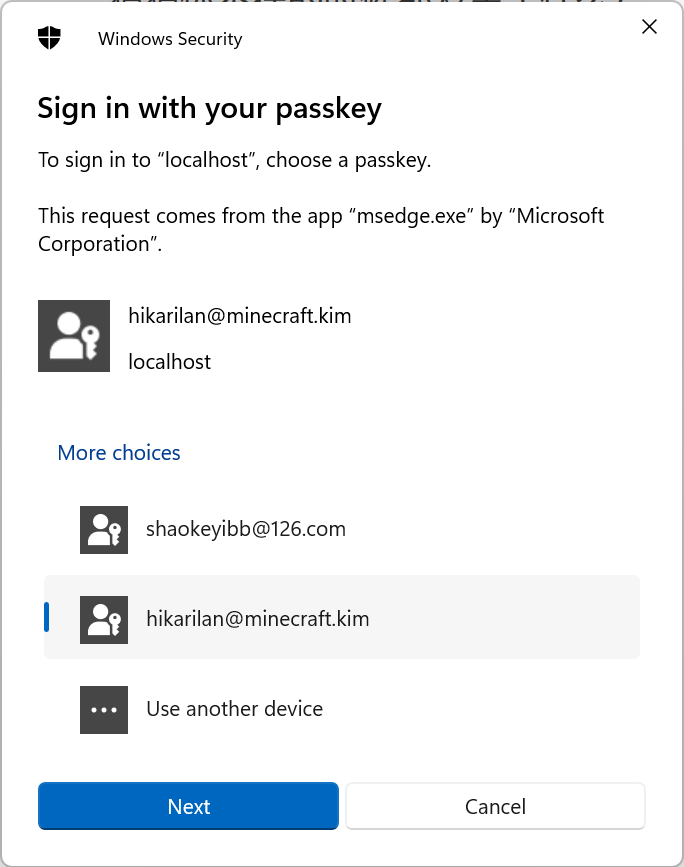
认识 Web Authentication API
为了创建和认证 Web 认证凭据,浏览器为我们提供了 Web Authentication API(简称 Webauthn),该 API 为我们提供了两个主要方法:
- navigator.credentials.create() (en-US) - 当使用 publicKey 选项时,创建一个新的凭据,无论是用于注册新账号还是将新的非对称密钥凭据与已有的账号关联。
- navigator.credentials.get() (en-US) - 当使用 publicKey 选项时,使用一组现有的凭据进行身份验证服务,无论是用于用户登录还是双因素验证中的一步。
通过这两个方法,我们可以将 Web 认证凭据的创建和认证过程大致拆分为以下几部分:
凭据创建
- 浏览器向服务器发起请求,获取凭据创建所需的 options 信息(例如站点 ID ,用户信息,防重放 challenge 等);
- 浏览器调用
navigator.credentials.create()方法,传入上一步获取的 options ,浏览器调用操作系统接口弹出对话框要求用户进行身份验证以创建密钥; - 如果用户身份验证成功,那么浏览器则应该向服务器发起请求,返回上一步调用方法的返回值;服务器将对该值进行验证,如果验证通过,则将相关信息存储到数据库中,此时凭据创建成功;
凭据认证
- 浏览器向服务器发起请求,获取凭据认证所需的 options 信息(例如站点 ID ,防重放 challenge 等);
- 浏览器调用
navigator.credentials.get()方法,传入上一步获取的 options ,浏览器调用操作系统接口弹出对话框要求用户选择进行身份验证的密钥并进行身份验证; - 如果用户身份验证成功,那么浏览器则应该向服务器发起请求,返回上一步调用方法的返回值;服务器将对该值进行验证,如果验证通过,则凭据认证成功,服务器可在更新密钥信息后将用户登录到站点(或者通过 2FA 验证)。
部署 Passkey 验证环境
本例中使用 Java 17 + Spring Boot 3 进行后端服务器的开发,并使用 Spring Data JPA 作为 ORM 框架(使用 PostgreSQL 作为数据库),Spring Data Redis 提供 Redis 能力支持。
除此之外,我们额外引入了三个库来简化开发:
java-webauthn-server,这是一个基于 Scala 和 Java 开发的 Webauthn 库,提供了较为完整的 Webauthn API 对接流程;
在 Gradle 引入
java-webauthn-server:implementation("com.yubico:webauthn-server-core:2.5.0")在 Maven 引入
java-webauthn-server:<dependency> <groupId>com.yubico</groupId> <artifactId>webauthn-server-core</artifactId> <version>2.5.0</version> <scope>compile</scope> </dependency>
@github/webauthn-json,由 GitHub 开发的 Webauthn 前端辅助库,通过包装了 Webauthn API 方法以实现在服务器和浏览器之间便捷的编码并传输 options 对象数据。
通过 npm 安装
@github/webauthn-json:npm install --save @github/webauthn-json通过 yarn 安装
@github/webauthn-json:yarn add --save @github/webauthn-json通过 pnpm 安装
@github/webauthn-json:pnpm install --save @github/webauthn-json
hypersistence-utils,可为 Hibernate 提供更多的类型支持,此处我们使用其提供的 JSON 类型来快速的序列化java-webauthn-server提供的 POJO 。
在 Gradle 引入
hypersistence-utils(对于 Hibernate 6.2 及以上版本):implementation("io.hypersistence:hypersistence-utils-hibernate-62:3.5.0")在 Maven 引入
hypersistence-utils(对于 Hibernate 6.2 及以上版本):<dependency> <groupId>io.hypersistence</groupId> <artifactId>hypersistence-utils-hibernate-62</artifactId> <version>3.5.0</version> </dependency>
实现 Passkey 创建和验证
对接 CredentialRepository
java-webauthn-server 需要访问我们存储的密钥信息才能为我们完成请求的校验工作,因此,这要求我们实现 CredentialRepository 接口:
// Copyright (c) 2018, Yubico AB // All rights reserved. // // Redistribution and use in source and binary forms, with or without // modification, are permitted provided that the following conditions are met: // // 1. Redistributions of source code must retain the above copyright notice, this // list of conditions and the following disclaimer. // // 2. Redistributions in binary form must reproduce the above copyright notice, // this list of conditions and the following disclaimer in the documentation // and/or other materials provided with the distribution. // // THIS SOFTWARE IS PROVIDED BY THE COPYRIGHT HOLDERS AND CONTRIBUTORS "AS IS" // AND ANY EXPRESS OR IMPLIED WARRANTIES, INCLUDING, BUT NOT LIMITED TO, THE // IMPLIED WARRANTIES OF MERCHANTABILITY AND FITNESS FOR A PARTICULAR PURPOSE ARE // DISCLAIMED. IN NO EVENT SHALL THE COPYRIGHT HOLDER OR CONTRIBUTORS BE LIABLE // FOR ANY DIRECT, INDIRECT, INCIDENTAL, SPECIAL, EXEMPLARY, OR CONSEQUENTIAL // DAMAGES (INCLUDING, BUT NOT LIMITED TO, PROCUREMENT OF SUBSTITUTE GOODS OR // SERVICES; LOSS OF USE, DATA, OR PROFITS; OR BUSINESS INTERRUPTION) HOWEVER // CAUSED AND ON ANY THEORY OF LIABILITY, WHETHER IN CONTRACT, STRICT LIABILITY, // OR TORT (INCLUDING NEGLIGENCE OR OTHERWISE) ARISING IN ANY WAY OUT OF THE USE // OF THIS SOFTWARE, EVEN IF ADVISED OF THE POSSIBILITY OF SUCH DAMAGE. package com.yubico.webauthn; import com.yubico.webauthn.data.ByteArray; import com.yubico.webauthn.data.PublicKeyCredentialDescriptor; import java.util.Optional; import java.util.Set; /** * An abstraction of the database lookups needed by this library. * * <p>This is used by {@link RelyingParty} to look up credentials, usernames and user handles from * usernames, user handles and credential IDs. */ public interface CredentialRepository { /** * Get the credential IDs of all credentials registered to the user with the given username. * * <p>After a successful registration ceremony, the {@link RegistrationResult#getKeyId()} method * returns a value suitable for inclusion in this set. */ Set<PublicKeyCredentialDescriptor> getCredentialIdsForUsername(String username); /** * Get the user handle corresonding to the given username - the inverse of {@link * #getUsernameForUserHandle(ByteArray)}. * * <p>Used to look up the user handle based on the username, for authentication ceremonies where * the username is already given. */ Optional<ByteArray> getUserHandleForUsername(String username); /** * Get the username corresponding to the given user handle - the inverse of {@link * #getUserHandleForUsername(String)}. * * <p>Used to look up the username based on the user handle, for username-less authentication * ceremonies. */ Optional<String> getUsernameForUserHandle(ByteArray userHandle); /** * Look up the public key and stored signature count for the given credential registered to the * given user. * * <p>The returned {@link RegisteredCredential} is not expected to be long-lived. It may be read * directly from a database or assembled from other components. */ Optional<RegisteredCredential> lookup(ByteArray credentialId, ByteArray userHandle); /** * Look up all credentials with the given credential ID, regardless of what user they're * registered to. * * <p>This is used to refuse registration of duplicate credential IDs. Therefore, under normal * circumstances this method should only return zero or one credential (this is an expected * consequence, not an interface requirement). */ Set<RegisteredCredential> lookupAll(ByteArray credentialId); } 可以看到,CredentialRepository 要求我们实现对注册凭据和用户信息的查询,为此,我们创建 WebauthnCredentialEntity,作为数据库实体类,完成数据表结构构造:
@NoArgsConstructor @AllArgsConstructor @Entity public class WebauthnCredentialEntity { @Id @GeneratedValue(strategy = GenerationType.AUTO) @Column(nullable = false) @Getter @Setter private long id; @Column(nullable = false) @Getter @Setter private long userID; @Column(nullable = false, columnDefinition = "jsonb") @Type(JsonType.class) private CredentialRegistration credentialRegistration; } 此处我们设置 credentialRegistration 字段的列类型为 jsonb,代表 PostgreSQL 的二进制 JSON 类型,对于 MySQL ,则可以使用 json 作为列类型。
该数据库实体类存储了用户 ID 和 CredentialRegistration 注册凭据的对应关系,方便我们存储用户凭据信息。
而 CredentialRegistration 数据类的构造如下:
@Builder @Data @JsonAutoDetect(fieldVisibility = JsonAutoDetect.Visibility.NON_PRIVATE) public class CredentialRegistration implements Serializable { @NotNull UserIdentity userIdentity; @Nullable String credentialNickname; @NotNull SortedSet<@NotNull AuthenticatorTransport> transports; @NotNull RegisteredCredential credential; @Nullable Object attestationMetadata; @NotNull private Instant registration; @JsonGetter("registration") public String getRegistration() { return registration.toString(); } @JsonSetter("registration") public void setRegistration(String registration) { this.registration = Instant.parse(registration); } @JsonIgnore public String getUsername() { return userIdentity.getName(); } } 其存储了以下关键信息:
com.yubico.webauthn.data.UserIdentity userIdentity,存储用户标识,由String name,String displayName,ByteArray id三部分组成,只有id字段作为唯一标识符标识唯一用户,name和displayName则只是为用户提供人类可读的文本信息用以标识该账户的名称;String credentialNickname,该凭据的昵称,方便用户识别,也可不填(Nullable);SortedSet<com.yubico.webauthn.data.AuthenticatorTransport> transports,该凭据支持的传输方式,例如USB,BLE,NFC等;com.yubico.webauthn.RegisteredCredential credential,凭证详细数据,包括凭证 ID ,凭证对应的用户 ID ,凭证公钥,签名计数,备份信息等。该信息由浏览器生成并发回到服务端;Object attestationMetadata,自定义元数据, 可空(Nullable);Instant registration,凭据的注册时间。
根据实体类,我们创建对应的 Spring Data JPA Repository:
@Repository public interface WebauthnCredentialRepository extends JpaRepository<WebauthnCredentialEntity, Long> { // 根据用户 ID 获取该用户的所有凭据信息 List<WebauthnCredentialEntity> findAllByUserID(long userID); } 然后,创建 CredentialRepositoryImpl 类,实现 CredentialRepository 接口:
@RequiredArgsConstructor @Component public class CredentialRepositoryImpl implements CredentialRepository { private final WebauthnCredentialRepository webauthnCredentialRepository; // 根据用户名获取凭证信息 @Override public Set<PublicKeyCredentialDescriptor> getCredentialIdsForUsername(String username) { return webauthnCredentialRepository.findAllByUserID(getUserIDByEmail(username)).stream() .map(WebauthnCredentialEntity::getCredentialRegistration) .map(it -> PublicKeyCredentialDescriptor.builder() .id(it.getCredential().getCredentialId()) .transports(it.getTransports()) .build()) .collect(Collectors.toUnmodifiableSet()); } // 根据 UserHandle 获取用户名 @Override public Optional<String> getUsernameForUserHandle(ByteArray userHandle) { return getRegistrationsByUserHandle(userHandle).stream() .findAny() .map(CredentialRegistration::getUsername); } // 根据用户名获取 UserHandle @Override public Optional<ByteArray> getUserHandleForUsername(String username) { return getRegistrationsByUsername(username).stream() .findAny() .map(reg -> reg.getUserIdentity().getId()); } // 根据凭证 ID 和 UserHandle 获取单个凭证信息 @Override public Optional<RegisteredCredential> lookup(ByteArray credentialId, ByteArray userHandle) { Optional<CredentialRegistration> registratiOnMaybe= webauthnCredentialRepository.findAll().stream() .map(WebauthnCredentialEntity::getCredentialRegistration) .filter(it -> it.getCredential().getCredentialId().equals(credentialId)) .findAny(); return registrationMaybe.map(it -> RegisteredCredential.builder() .credentialId(it.getCredential().getCredentialId()) .userHandle(it.getCredential().getUserHandle()) .publicKeyCose(it.getCredential().getPublicKeyCose()) .signatureCount(it.getCredential().getSignatureCount()) .build()); } // 根据凭证 ID 获取多个凭证信息 @Override public Set<RegisteredCredential> lookupAll(ByteArray credentialId) { return webauthnCredentialRepository.findAll().stream() .map(WebauthnCredentialEntity::getCredentialRegistration) .filter(it -> it.getCredential().getCredentialId().equals(credentialId)) .map(it -> RegisteredCredential.builder() .credentialId(it.getCredential().getCredentialId()) .userHandle(it.getCredential().getUserHandle()) .publicKeyCose(it.getCredential().getPublicKeyCose()) .signatureCount(it.getCredential().getSignatureCount()) .build()) .collect(Collectors.toUnmodifiableSet()); } private long getUserIDByEmail(String email) { // your own implemention } private Collection<CredentialRegistration> getRegistrationsByUsername(String username) { return webauthnCredentialRepository.findAllByUserID(getUserIDByEmail(username)).stream() .map(WebauthnCredentialEntity::getCredentialRegistration) .toList(); } private Collection<CredentialRegistration> getRegistrationsByUserHandle(ByteArray userHandle) { return webauthnCredentialRepository.findAll().stream() .map(WebauthnCredentialEntity::getCredentialRegistration) .filter(it -> it.getUserIdentity().getId().equals(userHandle)) .toList(); } } 值得一提的是,userHandle 是一个 com.yubico.webauthn.data.ByteArray 类,封装了一个 byte[] 数组,用于代表用户的唯一 ID ,而 username 并不是代表用户的用户名,而是代表某个唯一的用户标识符。在本例中,我们使用用户 ID 作为 userHandle,而使用用户的电子邮件地址作为 username。
最后,由于直接使用 JSON 对数据进行序列化,因此我们难以直接对某些字段进行 SQL 查询,只能全部拿出来再通过 stream 筛选,这可能会引发一些性能问题。
如此一来,我们便成功实现了 CredentialRepository 接口。
构造 RelyingParty
实现 CredentialRepository 接口后,我们便可开始构造 RelyingParty 类。在 java-webauthn-server 库中,RelyingParty 类是所有 API 操作的入口点,我们需要为其传入 id 和 name 进行构造,这对应了 Webauthn API 上 options 中的 rp 字段:
id代表供应商 ID ,应当是一段域名,该域名必须和实际服务域名完全符合(或者填入顶级域名来匹配根域名和所有二级域名);name代表供应商名称,可随意填写。
值得一提的是,为了安全起见,浏览器上的 Webauthn API 仅会接受来自 HTTPS 连接的网站调用其 API (或者本地回环地址 localhost,可以免于采用 HTTPS 连接);对于其他情况,该 API 会返回 undefined。
接下来,创建 WebauthnConfiguration 类,构造 RelyingParty 类并将其注入 Spring Bean 容器中:
@RequiredArgsConstructor @Configuration public class WebauthnConfiguration { private final CredentialRepository credentialRepository; @Value("${webauthn.relying-party.id}") private String relyingPartyId; @Value("${webauthn.relying-party.name}") private String relyingPartyName; @Bean public RelyingParty relyingParty() { var rpIdentity = RelyingPartyIdentity.builder() .id(relyingPartyId) .name(relyingPartyName) .build(); return RelyingParty.builder() .identity(rpIdentity) .credentialRepository(credentialRepository) .build(); } } 如此一来,我们便成功构造了 RelyingParty 类。
实现 Passkey 逻辑(后端 Controller ,前端 hook )
实现 Passkey 逻辑(后端 Service )
由于 V2EX 主题内容长度限制,烦请移步至 我的博客 或者我的微信公众号 “HikariLan 的博客” 阅读完整文章,抱歉!
最后
本文的主干代码是从我最近正在积极开发的简易轻论坛程序 NeraBBS 中剥离出来的,为了简化示例,对原项目代码做了许多现场修改(原项目是由多个 Spring Cloud 微服务组成的,并通过 gRPC 进行数据交换,此处为了简化直接省略了这部分代码),因此可能存在一些问题,如果读者发现,请积极指正,谢谢!
参考资料
- Create a passkey for passwordless logins (web.dev)
- Web Authentication API - Web API 接口参考 | MDN (mozilla.org)
- Yubico/java-webauthn-server: Server-side Web Authentication library for Java https://www.w3.org/TR/webauthn/#rp-operations (github.com)
- github/webauthn-json: A small WebAuthn API wrapper that translates to/from pure JSON using base64url.
- vladmihalcea/hypersistence-utils: The Hypersistence Utils library (previously known as Hibernate Types) gives you Spring and Hibernate utilities that can help you get the most out of your data access layer. (github.com)


 Select Language