

这是一个创建于 1721 天前的主题,其中的信息可能已经有所发展或是发生改变。
如图
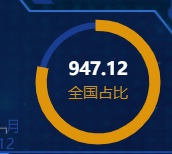
这是我用 guage 仪表盘做的环形图,现在的问题是 tooltip 死活出不来,各种地方都设置了就是无效 。有大佬能指点一下吗?
附上 option
option: { tooltip: { trigger: "item", show: true, triggerOn: "mousemove", alwaysShowContent: true, formatter: function (params) { console.log(params); return "123"; }, }, series: [ { type: "gauge", startAngle: 90, endAngle: -270, radius: "95%", min: 0, max: 1206.88, //全国 pointer: { show: false, }, itemStyle: { color: "rgb(223, 149, 10)", }, progress: { show: true, overlap: false, clip: false, itemStyle: { borderWidth: 4, borderColor: "rgb(223, 149, 10)", }, }, axisLine: { lineStyle: { width: 5, //宽度 color: [[1, "rgb(25, 61, 144)"]], }, }, splitLine: { show: false, distance: 0, length: 10, }, axisTick: { show: false, }, axisLabel: { show: false, distance: 50, }, data: [ { value: 20, name: "全国占比", title: { offsetCenter: ["0%", "20%"], color: "rgb(207, 147, 25)", }, detail: { offsetCenter: ["0%", "-20%"], //1206.88 947.12 color: "white", }, }, ], title: { fontSize: 12, }, detail: { // width: 50, // height: 14, fontSize: 14, // color: "auto", // borderColor: "auto", // borderRadius: 20, // borderWidth: 1, // formatter: "{value}%", }, tooltip: { formatter: function (params) { console.log(params); return "123"; }, }, }, ], },  | 1 christin OP 更新解决方案 仪表盘的 tooltip 是在指针上的,需要鼠标移动到指针上才能出现。但是我之前写的指针不显示,所以无法出现。可以修改 pointer 的 show 为 true 然后再设置颜色为透明 即可使用 tooltip 了 |
 Select Language