
Win10 资源管理器里面的快速访问列表,文件夹后面的别针按钮怎么去掉啊 - V2EX
tojohnonly

Win10 资源管理器里面的快速访问列表,文件夹后面的别针按钮怎么去掉啊

  •  
  •   tojohnonly Jun 3, 2021 3055 views
    This topic created in 1810 days ago, the information mentioned may be changed or developed.

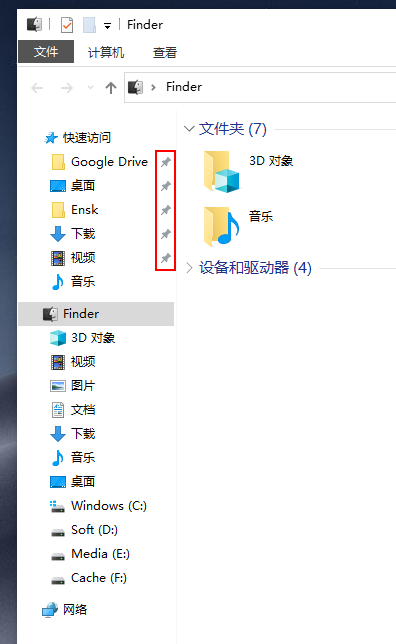
    如下图的红区部分

    16227005226863.png

    强迫症看着真不舒服

    11 replies    2021-06-04 16:23:15 +08:00
    xml123
        1
    xml123  
       Jun 3, 2021
    右键,从快速访问中取消固定
    tojohnonly
        2
    tojohnonly  
    OP
       Jun 3, 2021
    @xml123 我是想固定到快速访问列表,但是去除掉后面的别针按钮
    summerwar
        3
    summerwar  
       Jun 3, 2021
    应该没有办法,那个别针表示固定的意思
    szzhiyang
        4
    szzhiyang  
       Jun 3, 2021   1
    如果没有别针图标,怎么体现这些项目有没有固定?
    szzhiyang
        5
    szzhiyang  
       Jun 3, 2021
    可以把 imageres.dll 中的图钉图标换成全透明的。
    3dwelcome
        6
    3dwelcome  
       Jun 3, 2021
    强迫症建议先改一下文件夹背景颜色,纯白背景看着太刺眼了。
    tojohnonly
        7
    tojohnonly  
    OP
       Jun 3, 2021
    @szzhiyang 谢谢大佬,找到方案了

    1

    The solution provided by @Under A Tree seems to not work in Windows 10 Version 20H2. Here is an alternative solution.

    Install ResourceHacker

    Take control of your C:\Windows\SystemResources\imageres.dll.mun file. This can be done by opening CMD then inputting these commands

    cd C:\Windows\SystemResources

    takeown /f "%cd%" /r /d y

    icacls "%cd%" /grant Everyone:(OI)(CI)F /t /q

    Make a copy of your C:\Windows\SystemResources\imageres.dll.mun file

    create or download a transparent icon

    open ResourceHacker and the C:\Windows\SystemResources\imageres.dll.mun file

    click on Click on Icon Group

    find 5100:1033

    Select the icon and click control + r

    Select the transparent icon

    Use control + s to save

    https://superuser.com/questions/1442992/remove-the-grey-pins-from-quick-access-in-windows-10/1609090
    szzhiyang
        8
    szzhiyang  
       Jun 3, 2021
    @tojohnonly 别客气,我个人主页上的软件可以帮你更快地打开常用文件夹。
    syuraking
        9
    syuraking  
       Jun 3, 2021
    @tojohnonly WIN 系统更新试试看,九成是不能正常更新了
    tojohnonly
        10
    tojohnonly  
    OP
       Jun 4, 2021
    @syuraking 只是修改了一个文件,更新了下系统没啥问题
    tankren
        11
    tankren  
       Jun 4, 2021
    pin 啊 pin 就是图钉、、、
    About     Help     Advertise     Blog     API     FAQ     Solana     1216 Online   Highest 6679       Select Language
    创意工作者们的社区
    World is powered by solitude
    VERSION: 3.9.8.5 45ms UTC 23:19 PVG 07:19 LAX 16:19 JFK 19:19
    Do have faith in what you're doing.
    ubao msn snddm index pchome yahoo rakuten mypaper meadowduck bidyahoo youbao zxmzxm asda bnvcg cvbfg dfscv mmhjk xxddc yybgb zznbn ccubao uaitu acv GXCV ET GDG YH FG BCVB FJFH CBRE CBC GDG ET54 WRWR RWER WREW WRWER RWER SDG EW SF DSFSF fbbs ubao fhd dfg ewr dg df ewwr ewwr et ruyut utut dfg fgd gdfgt etg dfgt dfgd ert4 gd fgg wr 235 wer3 we vsdf sdf gdf ert xcv sdf rwer hfd dfg cvb rwf afb dfh jgh bmn lgh rty gfds cxv xcv xcs vdas fdf fgd cv sdf tert sdf sdf sdf sdf sdf sdf sdf sdf sdf sdf sdf sdf sdf sdf sdf sdf sdf sdf sdf sdf sdf sdf sdf sdf sdf sdf sdf sdf sdf sdf sdf sdf sdf sdf sdf sdf sdf sdf sdf sdf shasha9178 shasha9178 shasha9178 shasha9178 shasha9178 liflif2 liflif2 liflif2 liflif2 liflif2 liblib3 liblib3 liblib3 liblib3 liblib3 zhazha444 zhazha444 zhazha444 zhazha444 zhazha444 dende5 dende denden denden2 denden21 fenfen9 fenf619 fen619 fenfe9 fe619 sdf sdf sdf sdf sdf zhazh90 zhazh0 zhaa50 zha90 zh590 zho zhoz zhozh zhozho zhozho2 lislis lls95 lili95 lils5 liss9 sdf0ty987 sdft876 sdft9876 sdf09876 sd0t9876 sdf0ty98 sdf0976 sdf0ty986 sdf0ty96 sdf0t76 sdf0876 df0ty98 sf0t876 sd0ty76 sdy76 sdf76 sdf0t76 sdf0ty9 sdf0ty98 sdf0ty987 sdf0ty98 sdf6676 sdf876 sd876 sd876 sdf6 sdf6 sdf9876 sdf0t sdf06 sdf0ty9776 sdf0ty9776 sdf0ty76 sdf8876 sdf0t sd6 sdf06 s688876 sd688 sdf86
