

第一步: 我们用 docker 启动一个 web 协议的服务
可以把这个 docker 服务想像成一个无 UI 的网页版的微信,通过 grpc 暴露出一些自动化 API
在终端执行以下命令:
export WECHATY_LOG="verbose" export WECHATY_PUPPET="wechaty-puppet-wechat" export WECHATY_PUPPET_SERVER_PORT="30001" # 设置启动 web 协议后暴露出来的端口 export WECHATY_TOKEN="3d415ebb-7a6f-4cba-b602-1f4ae400f891" # 自己生成一串 uuid docker run -ti \ --name wechaty_puppet_service_token_gateway \ --rm \ -e WECHATY_LOG \ -e WECHATY_PUPPET \ -e WECHATY_PUPPET_SERVER_PORT \ -e WECHATY_TOKEN \ -p "$WECHATY_PUPPET_SERVER_PORT:$WECHATY_PUPPET_SERVER_PORT" \ wechaty/wechaty:latest 等待启动成功,会输出一堆日志, 当看到有输出 Online QR Code Image: https://wechaty.js.org/qrcode/xxxx 就说明启动成功了
07:47:33 VERB PuppetWeChat start() throttleQueue.subscribe() new item: [object Object] 07:47:33 INFO IoClient [2] https://login.weixin.qq.com/l/xxxxxxx Online QR Code Image: https://wechaty.js.org/qrcode/https%3A%2F%2Flogin.weixin.qq.com%2Fl%2F4Yxxxx 07:47:33 VERB StorageFile save() to /wechaty/3d415ebb-7a6f-4cba-b602-1f4ae400f011.memory-card.json 第二步: 启动 go 写的机器人
主要使用这个开源包 https://github.com/wechaty/go-wechaty 作为 sdk
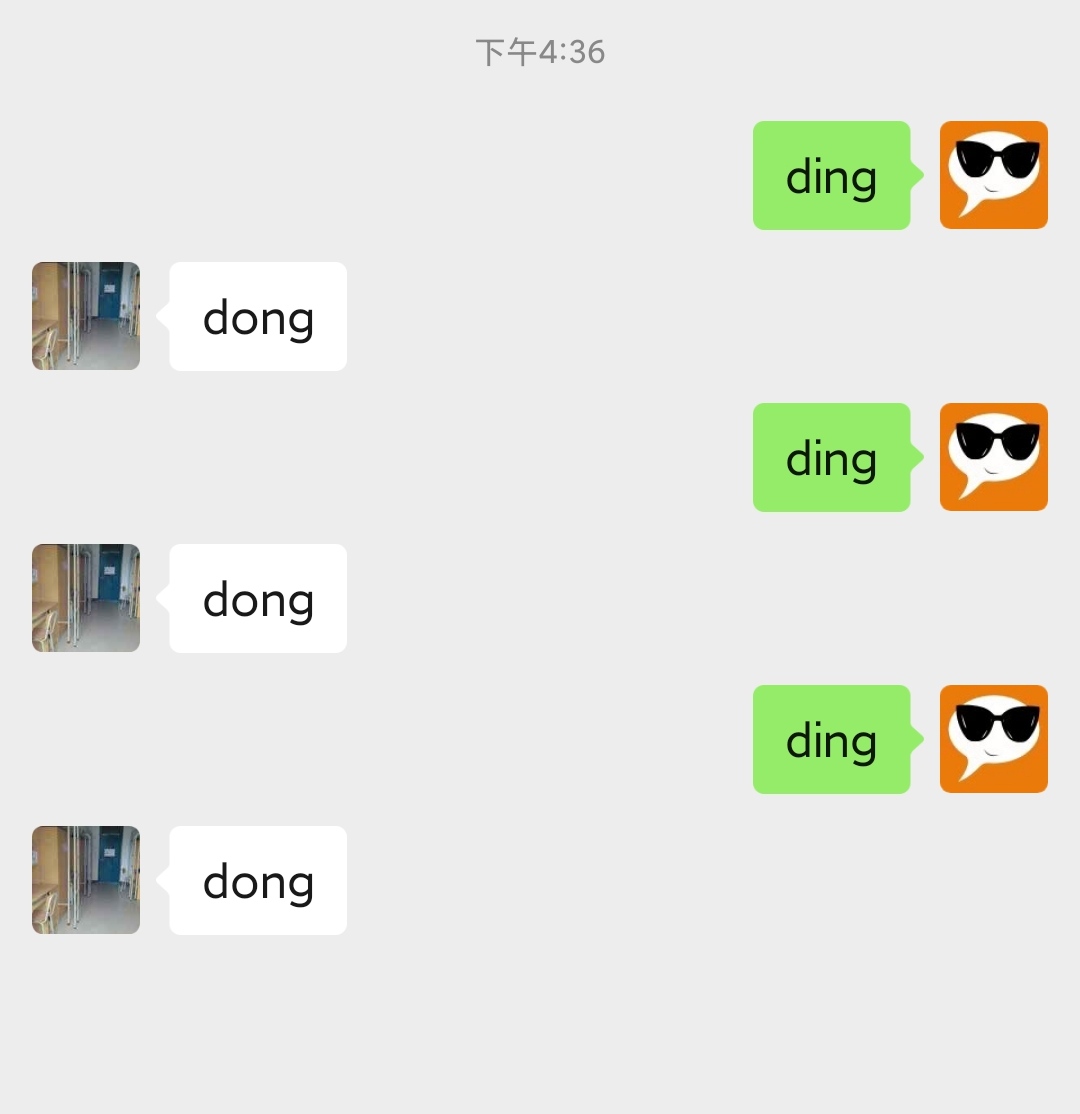
一个简单的机器人已经提前写好了,我们 clone 下来就可以直接跑起来,这个机器人功能很简单,只要接到 ding 的消息就会回复一个 dong
执行如下命令:
git clone https://github.com/wechaty/go-wechaty-getting-started.git cd go-wechaty-getting-started WECHATY_PUPPET_SERVICE_ENDPOINT=127.0.0.1:30001 make bot 程序跑起来之后,会返回一个微信登录二维码的链接,浏览器打开链接,然后用微信扫码,这样一个机器人就启动起来了
$ WECHATY_PUPPET_SERVICE_ENDPOINT=127.0.0.1:30001 make bot go run examples/ding-dong-bot.go 2021/04/17 16:05:52 PuppetService Start() 2021/04/17 16:05:52 PuppetService onGrpcStreamEvent({type:EVENT_TYPE_SCAN payload:{"qrcode":"https://login.weixin.qq.com/l/xxxx","status":2}}) Scan QR Code to login: ScanStatusWaiting https://wechaty.js.org/qrcode/https://login.weixin.qq.com/l/xxxx 2021/04/17 16:08:45 PuppetService onGrpcStreamEvent({type:EVENT_TYPE_SCAN payload:{"qrcode":"https://login.weixin.qq.com/l/xxxx","status":4}}) Scan QR Code to login: ScanStatusConfirmed User nickname logined 我们用另一个微信向这个微信发送 ding 试下,可以看到机器人很快就回复了 dong
ding-dong 机器人的核心代码
package main import ( "fmt" "log" "os" "os/signal" "time" "github.com/wechaty/go-wechaty/wechaty" "github.com/wechaty/go-wechaty/wechaty-puppet/schemas" "github.com/wechaty/go-wechaty/wechaty/user" ) func main() { var bot = wechaty.NewWechaty() bot.OnScan(func(ctx *wechaty.Context, qrCode string, status schemas.ScanStatus, data string) { fmt.Printf("Scan QR Code to login: %v\nhttps://wechaty.js.org/qrcode/%s\n", status, qrCode) }).OnLogin(func(ctx *wechaty.Context, user *user.ContactSelf) { fmt.Printf("User %s logined\n", user.Name()) }).OnMessage(onMessage).OnLogout(func(ctx *wechaty.Context, user *user.ContactSelf, reason string) { fmt.Printf("User %s logouted: %s\n", user, reason) }) var err = bot.Start() if err != nil { panic(err) } var quitSig = make(chan os.Signal) signal.Notify(quitSig, os.Interrupt, os.Kill) select { case <-quitSig: log.Fatal("exit.by.signal") } } func onMessage(ctx *wechaty.Context, message *user.Message) { log.Println(message) if message.Self() { log.Println("Message discarded because its outgoing") } if message.Age() > 2*60*time.Second { log.Println("Message discarded because its TOO OLD(than 2 minutes)") } if message.Type() != schemas.MessageTypeText || message.Text() != "ding" { log.Println("Message discarded because it does not match 'ding'") return } // 1. reply 'dong' _, err := message.Say("dong") if err != nil { log.Println(err) return } log.Println("REPLY: dong") } 一些 link
- go-wechaty: go 语言写的开发微信机器人的 sdk,理论可以支持任意 im 软件
- go-wechaty-getting-started: ding dong 机器人源码
- @dchaofei: 我的 github 主页,目前做的开源项目就是 go-wechaty

 1
1


 Select Language