

这是一个创建于 1881 天前的主题,其中的信息可能已经有所发展或是发生改变。
更多精彩内容,请关注微信公众号:后端技术小屋
一文读懂 clickhouse 集群监控
常言道,兵马未至,粮草先行,在 clickhouse 上生产环境之前,我们就得制定好相关的监控方案,包括 metric 采集、报警策略、图形化报表。有了全面有效的监控,我们就仿佛拥有了千里眼顺风耳,对于线上任何风吹草动都能及时感知,在必要的情况下提前介入以避免线上故障。
业界常用的监控方案一般是基于 prometheus + grafana 生态。本文将介绍由 clickhouse-exporter(node-exporter) + prometheus + grafana 组成的监控方案。
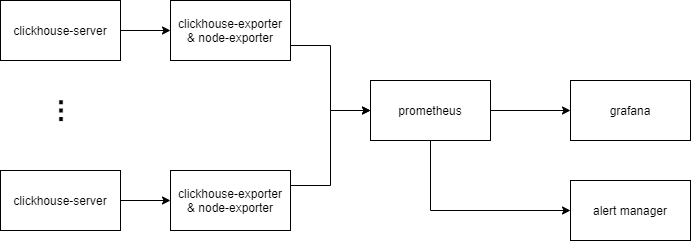
以上为监控方案示意图
- clickhouse-server 中有 4 个系统表会记录进程内部的指标,分别是
system.metrics,system.asynchronous_metrics,system.events,system.parts - clickhuse-exporter 是一个用于采集 clickhouse 指标的开源组件( https://github.com/ClickHouse/clickhouse_exporter),它会定时查询 clickhouse-server 中的系统表,转化成监控指标,并通过 HTTP 接口暴露给 prometheus.
- node-exporter 是一个用于采集硬件和操作系统相关指标的开源组件( https://github.com/prometheus/node_exporter)。
- prometheus 定时抓取 clickhouse-exporter 暴露的指标,并判断报警条件是否被触发,是则推送到 alert manager
- DBA 可通过 grafana 看板实时查看当前 clickhouse 集群的运行状态
- DBA 可通过 alertmanager 设置报警通知方式,如邮件、企业微信、电话等。
1 部署与配置
1.1 clickhouse-server
我们生产环境版本为20.3.8,按照官方文档部署即可。
1.2 clickhouse-exporter
clickhouse-exporter 一般与 clickhouse-server 同机部署。
首先下载最新代码并编译(需预先安装 Go)
git clone https://github.com/ClickHouse/clickhouse_exporter cd clickhouse_exporter go mod init go mod vendor go build ls ./clickhouse_exporter 然后启动
export CLICKHOUSE_USER="user" export CLICKHOUSE_PASSWORD="password" nohup ./-scrape_uri=http://localhost:port/ >nohup.log 2>&1 & 最后检查指标是否被正常采集:
> curl localhost:9116/metrics | head # TYPE clickhouse_arena_alloc_bytes_total counter clickhouse_arena_alloc_bytes_total 9.799096840192e+12 # HELP clickhouse_arena_alloc_chunks_total Number of ArenaAllocChunks total processed # TYPE clickhouse_arena_alloc_chunks_total counter clickhouse_arena_alloc_chunks_total 2.29782524e+08 # HELP clickhouse_background_move_pool_task Number of BackgroundMovePoolTask currently processed # TYPE clickhouse_background_move_pool_task gauge clickhouse_background_move_pool_task 0 # HELP clickhouse_background_pool_task Number of BackgroundPoolTask currently processed 1.3 node-exporter
node-exporter 需与 clickhouse-server 同机部署
首先下载最新代码并编译
git clone https://github.com/prometheus/node_exporter make build ls ./node_exporter 然后启动
nohup ./node_exporter > nohup.log 2>&1 & 最后检查指标是否被正常采集
> curl localhost:9100/metrics # HELP go_gc_duration_seconds A summary of the GC invocation durations. # TYPE go_gc_duration_seconds summary go_gc_duration_seconds{quantile="0"} 6.3563e-05 go_gc_duration_seconds{quantile="0.25"} 7.4746e-05 go_gc_duration_seconds{quantile="0.5"} 9.0556e-05 go_gc_duration_seconds{quantile="0.75"} 0.000110677 go_gc_duration_seconds{quantile="1"} 0.004362325 go_gc_duration_seconds_sum 28.451282046 go_gc_duration_seconds_count 223479 ... 1.4 prometheus
修改 prometheus 配置文件,添加 alertmanager 地址、clickhouse-exporter 地址
prometheus.yml 示例如下:
global: scrape_interval: 15s # Set the scrape interval to every 15 seconds. Default is every 1 minute. evaluation_interval: 15s # Evaluate rules every 15 seconds. The default is every 1 minute. # Alertmanager configuration alerting: alertmanagers: - static_configs: - targets: - alertmanager:9093 # Load rules once and periodically evaluate them according to the global 'evaluation_interval'. rule_files: - ./rules/*.rules # A scrape configuration containing exactly one endpoint to scrape: # Here it's Prometheus itself. scrape_configs: # The job name is added as a label `job=<job_name>` to any timeseries scraped from this config. - job_name: 'clickhouse' # metrics_path defaults to '/metrics' # scheme defaults to 'http'. static_configs: - targets: ['clickhouseexporter1:9116', 'clickhouseexporter2:9116', ...] *.rules 示例如下:
groups: - name: qps_too_high rules: - alert: clickhouse qps 超出阈值 expr: rate(clickhouse_query_total[1m]) > 100 for: 2m labels: job: clickhouse-server severity: critical alertname: clickhouse qps 超出阈值 annotations: summary: "clickhouse qps 超出阈值" description: "clickhouse qps 超过阈值(100), qps: {{ $value }}" 启动 promethus
nohup ./prometheus --config.file=/path/to/config --storage.tsdb.path=/path/to/storage --web.external-url=prometheus --web.enable-admin-api --web.enable-lifecycle --log.level=warn >nohup.log 2>&1 & 浏览器输入http://prometheus_ip:9090检查 prometheus 状态
1.5 alert manager
首先修改配置文件
配置文件示例如下:
route: receiver: 'default' group_by: ['service','project'] receivers: - name: "电话" webhook_configs: - url: <url> - name: "企业微信" webhook_configs: - url: <url> - name: "邮箱" webhook_configs: - url: <url> 然后启动
nohup ./alertmanager --config.file=/path/to/config --log.level=warn >nohup.log 2>&1 & 1.6 grafana
关于 clickhouse 的 dashboard 模板已经有很多,在这里推荐: https://grafana.com/grafana/dashboards/882 将它导入到新建的 grafana dashboard 之后,即可得到漂亮的 clickhouse 集群看板(可能需要微调)。
另外建议安装 clickhouse datasource 插件。有了这个插件便能在 grafana 中配置 clickhouse 数据源,并通过 Clickhouse SQL 配置图表,详细文档见: https://grafana.com/grafana/plugins/vertamedia-clickhouse-datasource
2 重要指标和监控
我们可以看到,不管是 node-exporter 是 clickhouse-exporter,它们的指标种类很多,大概有几百个。我们的策略是抓大放小,对于重要的指标才设置报警策略并创建看板。
下面列举一些个人觉得比较重要的指标
2.1 系统指标
系统指标由 node-exporter 采集
| 指标名 | 指标含义 | 报警策略 | 策略含义 |
|---|---|---|---|
| node_cpu_seconds_total | 机器累计 cpu 时间(单位 s) | 100 * sum without (cpu) (rate(node_cpu_seconds_total{mode='user'}[5m])) / count without (cpu) (node_cpu_seconds_total{mode='user'}) > 80 | 用户态 cpu 利用率大于 80%则报警 |
| node_filesystem_size_bytes/node_filesystem_avail_bytes | 机器上个文件分区容量 /可用容量 | 100 * (node_filesystem_size_bytes{mountpoint="/data"} - node_filesystem_avail_bytes{mountpoint="/data"}) / node_filesystem_size_bytes{mountpoint="/data"} > 80 | /data 盘占用超过 80%则报警 |
| node_load5 | 5 分钟 load 值 | node_load5 > 60 | 5 分钟 load 值超过 60 则报警(可根据具体情况设置阈值) |
| node_disk_reads_completed_total | 累计读磁盘请求次数 | rate(node_disk_reads_completed_total[5m]) > 200 | read iops 超过 200 则报警 |
2.2 clickhouse 指标
| 指标名 | 指标含义 | 报警策略 | 策略含义 |
|---|---|---|---|
| clickhouse_exporter_scrape_failures_total | prometheus 抓取 exporter 失败总次数 | increase(clickhouse_exporter_scrape_failures_total[5m]) > 10 | prometheus 抓取 export 失败次数超过阈值则报警,说明此时 ch 服务器可能发生宕机 |
| promhttp_metric_handler_requests_total | exporter 请求 clickhouse 失败总次数 | increase(promhttp_metric_handler_requests_total{code="200"}[2m]) == 0 | 2 分钟内查询 clickhouse 成功次数为零则报警,说明此时某个 ch 实例可能不可用 |
| clickhouse_readonly_replica | ch 实例中处于只读状态的表个数 | clickhouse_readonly_replica > 5 | ch 中只读表超过 5 则报警,说明此时 ch 与 zk 连接可能发生异常 |
| clickhouse_query_total | ch 已处理的 query 总数 | rate(clickhouse_query_total[1m]) > 30 | 单实例 qps 超过 30 则报警 |
| clickhouse_query | ch 中正在运行的 query 个数 | clickhouse_query > 30 | 单实例并发 query 数超过阈值则报警 |
| clickhouse_tcp_connection | ch 的 TCP 连接数 | clickhouse_tcp_connection > XXX | 略 |
| clickhouse_http_connection | ch 的 HTTP 连接数 | clickhouse_http_connection > XXX | 略 |
| clickhouse_zoo_keeper_request | ch 中正在运行的 zk 请求数 | clickhouse_zoo_keeper_request > XXX | 略 |
| clickhouse_replicas_max_queue_size | ch 中 zk 副本同步队列的长度 | clickhouse_replicas_max_queue_size > 100 | zk 副本同步队列长度超过阈值则报警,说明此时副本同步队列出现堆积 |
2.3 其他常用 SQL
在 clickhouse 中,所有被执行的 Query 都会记录到system.query_log表中。因此我们可通过该表监控集群的查询情况。以下列举几种用于监控的常用 SQL 。为了更方便的查看,可添加到 grafana 看板中。
最近查询
SELECT event_time, user, query_id AS query, read_rows, read_bytes, result_rows, result_bytes, memory_usage, exception FROM clusterAllReplicas('cluster_name', system, query_log) WHERE (event_date = today()) AND (event_time >= (now() - 60)) AND (is_initial_query = 1) AND (query NOT LIKE 'INSERT INTO%') ORDER BY event_time DESC LIMIT 100 慢查询
SELECT event_time, user, query_id AS query, read_rows, read_bytes, result_rows, result_bytes, memory_usage, exception FROM clusterAllReplicas('cluster_name', system, query_log) WHERE (event_date = yesterday()) AND query_duration_ms > 30000 AND (is_initial_query = 1) AND (query NOT LIKE 'INSERT INTO%') ORDER BY query_duration_ms desc LIMIT 100 Top10 大表
SELECT database, table, sum(bytes_on_disk) AS bytes_on_disk FROM clusterAllReplicas('cluster_name', system, parts) WHERE active AND (database != 'system') GROUP BY database, table ORDER BY bytes_on_disk DESC LIMIT 10 Top10 查询用户
SELECT user, count(1) AS query_times, sum(read_bytes) AS query_bytes, sum(read_rows) AS query_rows FROM clusterAllReplicas('cluster_name', system, query_log) WHERE (event_date = yesterday()) AND (is_initial_query = 1) AND (query NOT LIKE 'INSERT INTO%') GROUP BY user ORDER BY query_times DESC LIMIT 10 更多精彩内容,请扫码关注微信公众号:后端技术小屋。如果觉得文章对你有帮助的话,请多多分享、转发、在看。
目前尚无回复
 Select Language