

这是一个创建于 2141 天前的主题,其中的信息可能已经有所发展或是发生改变。
vue-toy
200 行左右代码模拟 vue 实现,视图渲染部分使用React来代替Snabbdom,欢迎 Star 。 项目地址:https://github.com/bplok20010/vue-toy
已实现的参数:
interface Options { el: HTMLElement | string; propsData?: Record<string, any>; props?: string[]; name?: string; data?: () => Record<string, any>; methods?: Record<string, (e: Event) => void>; computed?: Record<string, () => any>; watch?: Record<string, (newValue: any, oldValue: any) => any>; render: (h: typeof React.createElement) => React.ReactNode; renderError?: (h: typeof React.createElement, error: Error) => React.ReactNode; mounted?: () => void; updated?: () => void; destroyed?: () => void; errorCaptured?: (e: Error, vm: React.ReactInstance) => void; } 示例:
import Vue from "vue-toy"; const Hello = Vue.component({ render(h){ return h('span', null, 'vue-toy') ; } }) new Vue({ el: document.getElementById("root"), data() { return { msg: "hello vue toy" }; }, render(h) { return h("h1", null, this.msg, h(Hello)); } }); 基本原理
官方原理图: 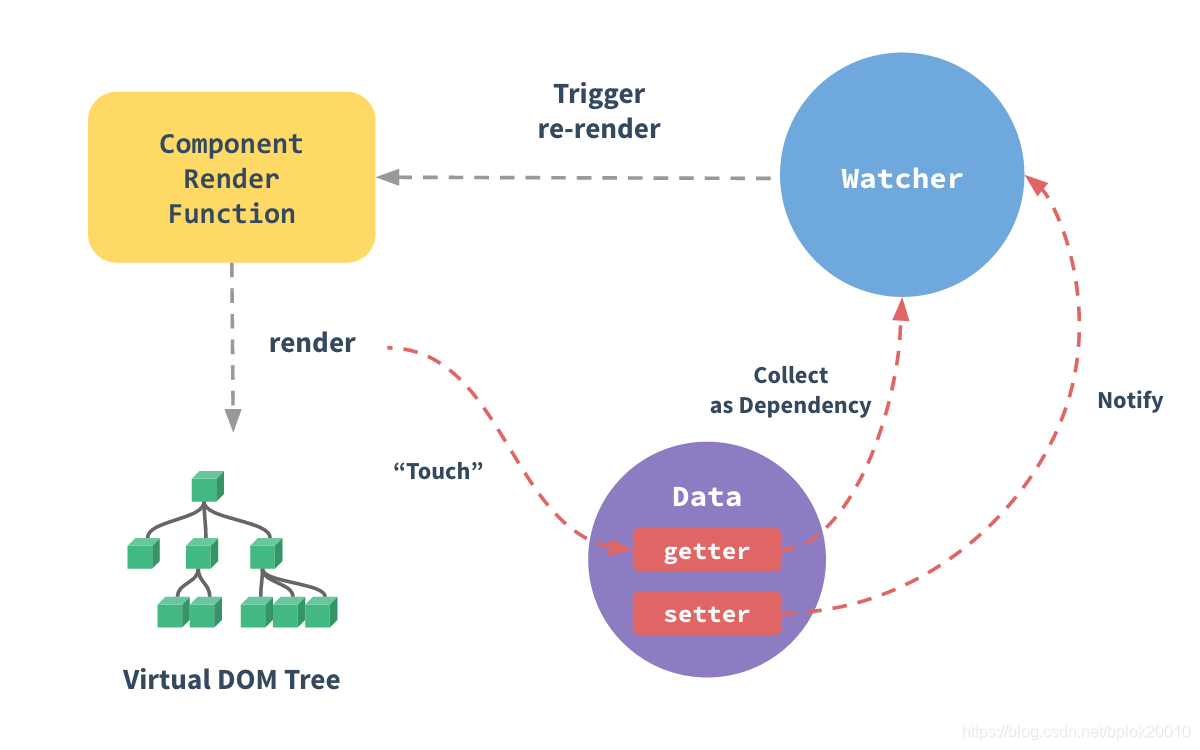 实现基本步骤:
- 使用 Observable 创建观察对象
- 定义好视图既 render 函数
- 收集视图依赖,并监听依赖属性
- 渲染视图
- 重复 3-4
// 创建观察对象 // 观察对象主要使用的是 Object.defineProperty 或 Proxy 来实现, const data = observable({ name: 'vue-toy', }); // 渲染模版 const render = function(){ return <h1>{data.name}</h1> } // 计算 render 的依赖属性, // 依赖属性改变时,会重新计算 computedFn,并执行监控函数 watchFn, // 属性依赖计算使用栈及可以了。 // watch(computedFn, watchFn); watch(render, function(newVNode, oldVNode){ update(newVNode, mountNode); }); //初始渲染 mount(render(), mountNode); // 改变观察对象属性,如果 render 依赖了该属性,则会重新渲染 data.name = 'hello vue toy'; 视图渲染部分(既 render)使用的是 vdom 技术,vue 使用
Snabbdom库,vue-toy使用的是react来进行渲染,所以在 render 函数里你可以直接使用 React 的 JSX 语法,不过别忘记import React from 'react',当然也可以使用preactinferno等 vdom 库。
由于 vue 的 template 的最终也是解析并生成 render 函数,模版的解析可用
htmleParser库来生成AST,剩下就是解析指令并生产代码,由于工作量大,这里就不具体实现,直接使用 jsx 。
响应式实现
一个响应式示例代码:
const data = Observable({ name: "none", }); const watcher =new Watch( data, function computed() { return "hello " + this.name; }, function listener(newValue, oldValue) { console.log("changed:", newValue, oldValue); } ); // changed vue-toy none data.name = "vue-toy"; Observable 实现
源码 观察对象创建这里使用 Proxy 实现,示例:
function Observable(data) { return new Proxy(data, { get(target, key) { return target[key]; }, set(target, key, value) { target[key] = value; return true; }, }); } 这就完成了一个对象的观察,但以上示例代码虽然能观察对象,但无法实现对象属性改动后通知观察者,这时还缺少 Watch 对象来计算观察函数的属性依赖及 Notify 来实现属性变更时的通知。
Watch 实现
定义如下:
Watch(data, computedFn, watchFn); - data 为 computedFn 的 上下文 既
this非必须 - computedFn 为观察函数并返回观察的数据,Watch 会计算出里面的依赖属性。
- watchFn 当 computedFn 返回内容发生改变时,watchFn 会被调用,同时接收到新、旧值
大概实现如下:
// Watch.js // 当前正在收集依赖的 Watch const CurrentWatchDep = { current: null, }; class Watch { constructor(data, exp, fn) { this.deps = []; this.watchFn = fn; this.exp = () => { return exp.call(data); }; // 保存上一个依赖收集对象 const lastWatchDep = CurrentWatchDep.current; // 设置当前依赖收集对象 CurrentWatchDep.current = this; // 开始收集依赖,并获取观察函数返回的值 this.last = this.exp(); // 还原 CurrentWatchDep.current = lastWatchDep; } clearDeps() { this.deps.forEach((cb) => cb()); this.deps = []; } // 监听依赖属性的改动,并保存取消回调 addDep(notify) { // 当依赖属性改变时,重新触发依赖计算 this.deps.push(notify.sub(() => { this.check(); })); } // 重新执行依赖计算 check() { // 清空所有依赖,重新计算 this.clearDeps(); // 作用同构造函数 const lastWatchDep = CurrentWatchDep.current; CurrentWatchDep.current = this; const newValue = this.exp(); CurrentWatchDep.current = lastWatchDep; const oldValue = this.last; // 对比新旧值是否改变 if (!shallowequal(oldValue, newValue)) { this.last = newValue; // 调用监听函数 this.watchFn(newValue, oldValue); } } } Notify 实现
观察对象发生改变后需要通知监听者,所以还需要实现通知者 Notify:
class Notify { constructor() { this.listeners = []; } sub(fn) { this.listeners.push(fn); return () => { const idx = this.listeners.indexOf(fn); if (idx === -1) return; this.listeners.splice(idx, 1); }; } pub() { this.listeners.forEach((fn) => fn()); } } 调整 Observable
前面的Observable太简单了,无法完成属性计算的需求,结合上面Watch Notify的来调整下 Observable 。
function Observable(data) { const protoListeners = Object.create(null); // 给观察数据的所有属性创建一个 Notify each(data, (_, key) => { protoListeners[key] = new Notify(); }); return new Proxy(data, { get(target, key) { // 属性依赖计算 if (CurrentWatchDep.current) { const watcher = CurrentWatchDep.current; watcher.addDep(protoListener[key]); } return target[key]; }, set(target, key, value) { target[key] = value; if (protoListeners[key]) { // 通知所有监听者 protoListeners[key].pub(); } return true; }, }); } 好了,观察者的创建和订阅都完成了,开始模拟 Vue 。
模拟 Vue
vue-toy 使用React来实现视图的渲染,所以 render 函数里如果使用 JSX 则需要引入 React
准备
既然已经实现了 Observable 和 Watch,那我们就来实现基本原理的示例:
import Observable from "vue-toy/cjs/Observable"; import Watch from "vue-toy/cjs/Watch"; function mount(vnode) { console.log(vnode); } function update(vnode) { console.log(vnode); } const data = Observable({ msg: "hello vue toy!", counter: 1 }); function render() { return `render: ${this.counter} | ${this.msg}`; } new Watch(data, render, update); mount(render.call(data)); setInterval(() => data.counter++, 1000); // 在控制台可看到每秒的输出信息 这时将 mount update 的实现换成 vdom 就可以完成一个基本的渲染。
但这还不够,我们需要抽象并封装成组件来用。
Component
这里的 Component 像是 React 的高阶函数 HOC,使用示例:
const Hello = Component({ props: ["msg"], data() { return { counter: 1, }; }, render(h) { return h("h1", null, this.msg, this.counter); }, }); 大概实现如下,options 参考文章开头
function Component(options) { return class extends React.Component { // 省略若干... constructor(props) { super(props); // 省略若干... // 创建观察对象 this.$data = Observable({ ...propsData, ...methods, ...data }, computed); // 省略若干... // 计算 render 依赖并监听 this.$watcher = new Watch( this.$data, () => { return options.render.call(this, React.createElement); }, debounce((children) => { this.$children = children; this.forceUpdate(); }) ); this.$children = options.render.call(this, React.createElement); } shouldComponentUpdate(nextProps) { if ( !shallowequal( pick(this.props, options.props || []), pick(nextProps, options.props || []) ) ) { this.updateProps(nextProps); this.$children = options.render.call(this, React.createElement); return true; } return false; } // 生命周期关联 componentDidMount() { options.mounted?.call(this); } componentWillUnmount() { this.$watcher.clearDeps(); options.destroyed?.call(this); } componentDidUpdate() { options.updated?.call(this); } render() { return this.$children; } }; } 创建主函数 Vue
最后创建入口函数 Vue,实现代码如下:
export default function Vue(options) { const RootCompOnent= Component(options); let el; if (typeof el === "string") { el = document.querySelector(el); } const props = { ...options.propsData, $el: el, }; return ReactDOM.render(React.createElement(RootComponent, props), el); } Vue.compOnent= Component; 好了,Vue 的基本实现完成了。
感谢阅读。
最后,欢迎 Star:https://github.com/bplok20010/vue-toy
 | 1 nomedia 2020 年 6 月 14 日 牛 |
 | 2 wensonsmith 2020 年 6 月 14 日 Nice |
 | 3 typetraits 2020 年 6 月 14 日 所以这是一个 Vue on React 吗  |
 | 4 nobo OP @typetraits 不是,文章只是简答拿来用。不过确实可以这么做,丢掉 template,其他不变,render 里写 react 的 jsx 或 template 编译成 react 的语法。 |
 Select Language