
V2EX = way to explore V2EX 是一个关于分享和探索的地方
Sign Up Now For Existing Member Sign In

This topic created in 2224 days ago, the information mentioned may be changed or developed.

序言
常见方式
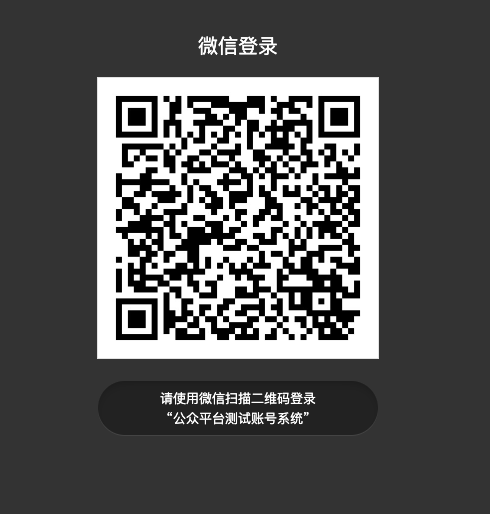
平常大家见到过最多的扫码登录应该是 开放平台网页登录 大概形式就是:点击微信登录后会出现一个黑页面,页面中有一个二维码,扫码后可以自动获取用户信息然后登录,但是这种方式需要申请开放平台比较麻烦。如图
利于推广方式
另外一种扫码登录方式只需要一个微信服务号就行,大概流程是:点击微信登录,网站自己弹出一个二维码、扫描二维码后弹出公众号的关注界面、只要一关注公众号网站自动登录、第二次扫描登录的时候网站直接登录,大家可以体验一下 「随便找的一个网站」,这种扫码登录的方式个人觉得非常利于推广公众号
前期准备
- 服务号(或者微信测试账号)
- EasyWeChat 扩展包
梳理
其实第二种扫码登录的原理很简单,核心就是依靠 微信带参二维码、EasyWeChat 二维码文档
简单的解释一下扫描这个带参二维码有什么不同:
- 扫描二维码,如果用户还未关注公众号,则用户可以关注公众号,关注后微信会将带场景值(自定义值)关注事件推送给开发者。
- 扫描二维码,如果用户已经关注公众号,在用户扫描后会自动进入会话,微信也会将带场景值(自定义值)扫码事件推送给开发者。
看到这里相信你已经明白了,梳理一下:
- 生成二维码的时候你自定义一个参数到二维码中,顺便把这个参数传到前端页面中。
- 前端页面根据这个参数轮询用户登录状态(也可使用 socket )。
- 用户扫码关注后会推送一个关注事件到服务端,也会把自定义参数带入到事件中。
- 根据 openid 创建用户后,然后在 Redis 中存储 Key 为场景值(自定义参数) Value 为用户创建后的 id 。
- 前端轮询方法中如果在 Redis 中获取到 Id 后,Auth 登陆,页面再重载一下,流程完毕。
实战
请求登录二维码
前端通过一个点击事件请求微信登录二维码
// 方便清除轮询 let timer = null $(document).on('click', '.wechat-login', function () { // 请求登录二维码 axios.get('{{ route('wx.pic') }}').then(respOnse=> { let result = response.data if (result.status_code !== 200) { return } // 显示二维码图片 $('.wechat-url').attr('src', result.data.url) // 轮询登录状态 timer = setInterval(() => { // 请求参数是二维码中的场景值 axios.get('{{ route('home.login.check') }}', {params: {wechat_flag: result.data.weChatFlag}}).then(respOnse=> { let result = response.data if (result.data) { window.location.href = '/' } }) }, 2000) }) }) // 返回时清除轮询 $('.wechat-back').click(function () { clearInterval(timer) }) 后端生成带参二维码逻辑,EasyWeChat 配置请自行查阅 文档
protected $app; /** * Construct * * WeChatController constructor. */ public function __construct() { $this->app = app('wechat.official_account'); } /** * 获取二维码图片 * * @param Request $request * * @return \Illuminate\Http\JsonResponse * @throws \Exception */ public function getWxPic(Request $request) { // 查询 cookie,如果没有就重新生成一次 if (!$weChatFlag = $request->cookie(WxUser::WECHAT_FLAG)) { $weChatFlag = Uuid::uuid4()->getHex(); } // 缓存微信带参二维码 if (!$url = Cache::get(WxUser::QR_URL . $weChatFlag)) { // 有效期 1 天的二维码 $qrCode = $this->app->qrcode; $result = $qrCode->temporary($weChatFlag, 3600 * 24); $url = $qrCode->url($result['ticket']); Cache::put(WxUser::QR_URL . $weChatFlag, $url, now()->addDay()); } // 自定义参数返回给前端,前端轮询 return $this->ajaxSuccess(compact('url', 'weChatFlag')) ->cookie(WxUser::WECHAT_FLAG, $weChatFlag, 24 * 60); } 用户扫描二维码后处理
/** * 微信消息接入(这里拆分函数处理) * * @return \Symfony\Component\HttpFoundation\Response * @throws \EasyWeChat\Kernel\Exceptions\BadRequestException * @throws \EasyWeChat\Kernel\Exceptions\InvalidArgumentException * @throws \EasyWeChat\Kernel\Exceptions\InvalidConfigException * @throws \ReflectionException */ public function serve() { $app = $this->app; $app->server->push(function ($message) { if ($message) { $method = camel_case('handle_' . $message['MsgType']); if (method_exists($this, $method)) { $this->openid = $message['FromUserName']; return call_user_func_array([$this, $method], [$message]); } Log::info('无此处理方法:' . $method); } }); return $app->server->serve(); } /** * 事件引导处理方法(事件有许多,拆分处理) * * @param $event * * @return mixed */ protected function handleEvent($event) { Log::info('事件参数:', [$event]); $method = camel_case('event_' . $event['Event']); Log::info('处理方法:' . $method); if (method_exists($this, $method)) { return call_user_func_array([$this, $method], [$event]); } Log::info('无此事件处理方法:' . $method); } /** * 取消订阅 * * @param $event */ protected function eventUnsubscribe($event) { $wxUser = WxUser::whereOpenid($this->openid)->first(); $wxUser->subscribe = 0; $wxUser->subscribe_time = null; $wxUser->save(); } /** * 扫描带参二维码事件 * * @param $event */ public function eventSCAN($event) { if ($wxUser = WxUser::whereOpenid($this->openid)->first()) { // 标记前端可登陆 $this->markTheLogin($event, $wxUser->uid); return; } } /** * 订阅 * * @param $event * * @throws \Throwable */ protected function eventSubscribe($event) { $openId = $this->openid; if ($wxUser = WxUser::whereOpenid($openId)->first()) { // 标记前端可登陆 $this->markTheLogin($event, $wxUser->uid); return; } // 微信用户信息 $wxUser = $this->app->user->get($openId); // 注册 $nickname = $this->filterEmoji($wxUser['nickname']); $result = DB::transaction(function () use ($openId, $event, $nickname, $wxUser) { $uid = Uuid::uuid4()->getHex(); $time = time(); // 用户 $user = User::create([ 'uid' => $uid, 'created_at' => $time, ]); // 用户信息 $user->user_info()->create([ 'email' => $user->email, 'nickname' => $nickname, 'sex' => $wxUser['sex'], 'address' => $wxUser['country'] . ' ' . $wxUser['province'] . ' ' . $wxUser['city'], 'avatar' => $wxUser['headimgurl'], 'code' => app(UserRegisterController::class)->inviteCode(10), 'created_at' => $time, ]); // 用户账户 $user->user_account()->create([ 'gold' => 200, 'created_at' => $time, ]); $wxUserModel = $user->wx_user()->create([ 'subscribe' => $wxUser['subscribe'], 'subscribe_time' => $wxUser['subscribe_time'], 'openid' => $wxUser['openid'], 'created_at' => $time, ]); Log::info('用户注册成功 openid:' . $openId); $this->markTheLogin($event, $wxUserModel->uid); }); Log::debug('SQL 错误: ', [$result]); } /** * 标记可登录 * * @param $event * @param $uid */ public function markTheLogin($event, $uid) { if (empty($event['EventKey'])) { return; } $eventKey = $event['EventKey']; // 关注事件的场景值会带一个前缀需要去掉 if ($event['Event'] == 'subscribe') { $eventKey = str_after($event['EventKey'], 'qrscene_'); } Log::info('EventKey:' . $eventKey, [$event['EventKey']]); // 标记前端可登陆 Cache::put(WxUser::LOGIN_WECHAT . $eventKey, $uid, now()->addMinute(30)); } 前端登录检查
/** * 微信用户登录检查 * * @param Request $request * * @return bool|\Illuminate\Http\JsonResponse */ public function loginCheck(Request $request) { // 判断请求是否有微信登录标识 if (!$flag = $request->wechat_flag) { return $this->ajaxSuccess(false); } // 根据微信标识在缓存中获取需要登录用户的 UID $uid = Cache::get(WxUser::LOGIN_WECHAT . $flag); $user = User::whereUid($uid)->first(); if (empty($user)) { return $this->ajaxSuccess(false); } // 登录用户、并清空缓存 auth('web')->login($user); Cache::forget(WxUser::LOGIN_WECHAT . $flag); Cache::forget(WxUser::QR_URL . $flag); return $this->ajaxSuccess(true); } OK,很实用的一个功能吧,赶快加到你项目中吧!
PS 欣赏一下

 | 1 alphayan Mar 29, 2020 收藏一下 |
 | 2 houlin Mar 29, 2020 这个是原文发过来的推广的吧,也没说清楚,只能用 la php 框架,我前段时间尝试用了 |

 | 5 oops1900 OP 嗯,主要核心就是微信官方给的「带参二维码」这个接口,这里给的是 PHP 语言的 demo,其他语言可以模仿写写。 |
 | 7 YvanGu Mar 30, 2020 今天下了个 APP,竟然只能使用社交账号登录,想了想,还是卸载了 |
 | 8 bilberry Mar 30, 2020 cool |
 | 9 seaflower Apr 14, 2020 好 谢谢楼主 |
 | 10 lijialong1313 Apr 14, 2020 @houlin 这个东西贼简单的啊……甚至不需要 demo 核心就是前端一直请求服务器是否登陆成功。 题主废话太多了我简单给你说一下 1.生成一个随机参数,然后丢到二维码里(参考微信文档如何生成带参二维码) 2.用户扫描二维码后,将会直接发送一个参数给服务器负责微信接收的部分。 3.服务器验证这个微信的是哪一个页面,然后在服务器中将这个随机参数标记为这个用户。 4.前端请求的时候发现这个用户了,然后直接登录即可。 用啥语言都可以做,其实很简单的,只需要认证的微信服务号就行。 |
| 11 houlin Apr 14, 2020 via Android @lijialong1313 认证服务号我有的啊 |
 Select Language