


现在的状态是这样:
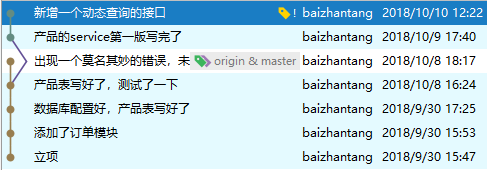
至于为什么会出现这种情况呢,是我在一次 checkout revision 之后,重新写了代码并提交了。现在我想把那个多余的 commit 删除掉,master 和 origin 都还指向它。现在我每次提交都会显示下面这个弹窗 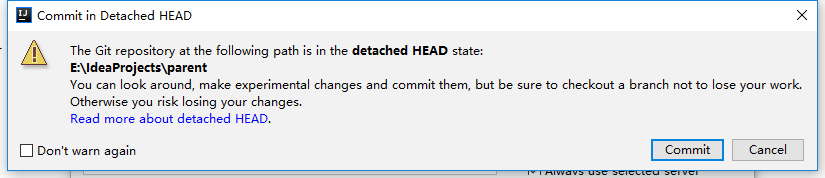
前辈们支支招,诚谢.

现在的状态是这样:
至于为什么会出现这种情况呢,是我在一次 checkout revision 之后,重新写了代码并提交了。现在我想把那个多余的 commit 删除掉,master 和 origin 都还指向它。现在我每次提交都会显示下面这个弹窗
前辈们支支招,诚谢.
 | 1 yianbin Oct 10, 2018 git push -f -u origin master 试试? |
 | 2 samuel37 Oct 10, 2018 为什么不直接把 repo 删了呢? 把错误的 commit revert 再 push。 |
 | 3 lnim Oct 10, 2018 via iPhone 本地修改好 push -f |
 | 4 jowan Oct 10, 2018 先退回:reset --soft 版本 再强行 push 远程库:git push -f 接下来 把同步版本后增加的 commit 提交就可以了 我一般都是这样做的 |
 | 5 Deville Oct 10, 2018  1 1 同 1L ,另外。。 有个建议。。个人习惯。。 觉得 commit 还是正式化些比较好。。少些口语表述。。 |
 | 6 que01 Oct 10, 2018 修改 .git/refs/heads/branch_name 里面的版本号(这个版本号要注意长度) 这样指向的就是目标版本号 并记住后面几次有效的版本号 使用 git cherry-pick aaa1111 bbb222 ccc333 这样重做有效提交这块 |
 | 7 Ooooooooozil Oct 10, 2018 1 commit message 推荐 http://gitmoji.carloscuesta.me |
 | 8 icylogic Oct 10, 2018 via iPhone 1 可以不删就尽量别删,比起删除一个 commit,更好的做法是用一个新的 commit 做 revert,并且写好为什么要这么做。 如果一定要删,就 reset 之后 push --force,不过做好被同事打的心理准备…… |
| 9 icylogic Oct 10, 2018 via iPhone revert 具体怎么做可以参考 https://www.atlassian.com/git/tutorials/undoing-changes/git-revert The git revert command can be considered an 'undo' type command, however, it is not a traditional undo operation. Instead of removing the commit from the project history, it figures out how to invert the changes introduced by the commit and appends a new commit with the resulting inverse content. This prevents Git from losing history, which is important for the integrity of your revision history and for reliable collaboration. |
 | 10 CoCoMcRee Oct 10, 2018 我一般是从出错前一个 commit 拉个 branch |
| 11 CoCoMcRee Oct 10, 2018 我一般是从出错的分支先改个名字(本地和远端都改), 再前一个 commit 拉个 branch , 然后把正确的再合过来, 然后把推到远端,再把名字改回来, 把之前出错的分支删掉就好了, 这样远端就相当于没有了这个出错的 commit |
 | 12 Raymon111111 Oct 10, 2018 reset 然后 push force |
 Select Language