
V2EX = way to explore V2EX 是一个关于分享和探索的地方
Sign Up Now For Existing Member Sign In
请不要在回答技术问题时复制粘贴 AI 生成的内容

This topic created in 459 days ago, the information mentioned may be changed or developed.
前贴
Hass-Panel
一个基于 React 的智能家居控制面板,基于 Home Assistant Websocket api 。
视频预览
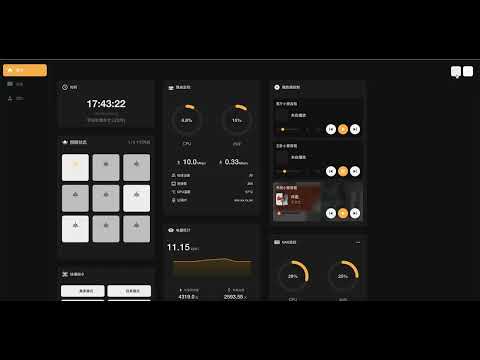
预览图

特性
- 响应式设计,支持移动端和桌面端
- 支持多种智能家居设备
- 灯光控制
- 空调控制
- 窗帘控制
- 传感器监控
- 摄像头查看
- 场景控制
- 更多设备支持中...
- 高度可配置,自由拖拽布局,支持移动端和桌面端
- PWA 支持,可安装到桌面
- 美观的用户界面,支持暗色模式
快速开始
配置
项目使用外部配置文件方式,可以在不重新构建的情况下修改配置。
-
复制示例配置文件:
# 克隆项目 git clone https://github.com/mrtian2016/hass-panel.git cd hass-panel cp public/config/userConfig.json.example public/config/userConfig.json -
根据您的 Home Assistant 环境编辑
userConfig.json
配置文件结构
配置文件包含以下主要部分(参考CONFIG.md):
天气
{ "weather": ["weather.your_weather_entity"] } 灯光
{ "lights": { "living_room": { "entity_id": "light.your_light_entity", "name": "客厅灯", "room": "living_room" } } } 传感器
{ "sensors": [ { "id": "LIVING_ROOM", "name": "客厅", "sensors": { "temperature": { "entity_id": "sensor.temperature_entity", "name": "温度", "icon": "mdiThermometer" }, "humidity": { "entity_id": "sensor.humidity_entity", "name": "湿度", "icon": "mdiWaterPercent" } } } ] } 空调
{ "climates": [ { "entity_id": "climate.ac_entity", "name": "客厅空调", "room": "living_room", "features": { "eco": { "entity_id": "switch.ac_eco_mode", "name": "节能", "icon": "mdiLeaf", "disableWhen": { "state": "off" } } } } ] } 窗帘
{ "curtains": [ { "entity_id": "cover.curtain_entity", "name": "客厅窗帘", "room": "living_room" } ] } 场景
{ "scripts": [ { "name": "离家模式", "entity_id": "script.away_mode", "icon": "log-out" } ] } 启动
# 修改 docker-compose.yml 中的 REACT_APP_HASS_URL 为你的 Home Assistant 实例地址, 然后启动 docker-compose up -d # 或者 docker run \ --name hass-panel \ --restart unless-stopped \ -p 5123:80 \ -e REACT_APP_HASS_URL=your-hass-instance:8123 \ -v "$(pwd)/public/media:/usr/share/nginx/html/static/media" \ -v "$(pwd)/public/config/userConfig.json:/usr/share/nginx/html/config/userConfig.json" \ -d \ ghcr.io/mrtian2016/hass-panel:latest 注意事项
- 配置文件必须是有效的 JSON 格式
- 所有的
entity_id必须与您的 Home Assistant 中的实体 ID 保持一致 - 只需要配置您需要使用的部分,未配置的部分将使用默认配置
- 修改配置后刷新页面即可生效
- 确保您的 Home Assistant 实体可以正常访问
常见问题
-
配置不生效
- 检查 JSON 格式是否正确
- 确认实体 ID 是否正确
- 刷新页面后重试
-
设备显示离线
- 检查 Home Assistant 连接是否正常
- 验证实体 ID 是否存在
- 确认设备是否在线
-
图标不显示
- 检查图标名称是否正确
- 确认使用了支持的图标
开发
# 安装依赖 npm install # 启动开发服务器 npm start # 构建生产版本 npm run build # 运行测试 npm test 贡献
欢迎提交 Pull Request 和 Issue !
9 replies 2025-01-23 15:07:01 +08:00
 | 1 mMartin OP 放到 homeassistant 里面的效果:  |
 | 2 Alps2333 Jan 23, 2025 NB ,我更想知道怎么跟 cursor 对话的,是自己先写一部分然后对话补充还是,让 cursor 从头到尾生成呢 |
 | 4 smalljop Jan 23, 2025 似乎用 docker 运行创建了一个 userConfig.json 的文件夹 |

 | 6 JackyYang Jan 23, 2025 重点是如何搭建的脚手架 然后 和 Cursor 对话过程 很期待这个记录 |
| 7 mMartin OP @JackyYang 搭建项目就是 react 官方的 cra ,对话记录太长了 我把 cursor500 次快速请求全部用完了 |
| 8 JackyYang Jan 23, 2025 感谢回复 UI 原型你是怎么和 Cursor 交互的? 1. figma 画原型? 2. 直接文字描述? |
 Select Language