
V2EX = way to explore V2EX 是一个关于分享和探索的地方
Sign Up Now For Existing Member Sign In

This topic created in 706 days ago, the information mentioned may be changed or developed.

本文由ScriptEcho平台提供技术支持
项目地址:传送门
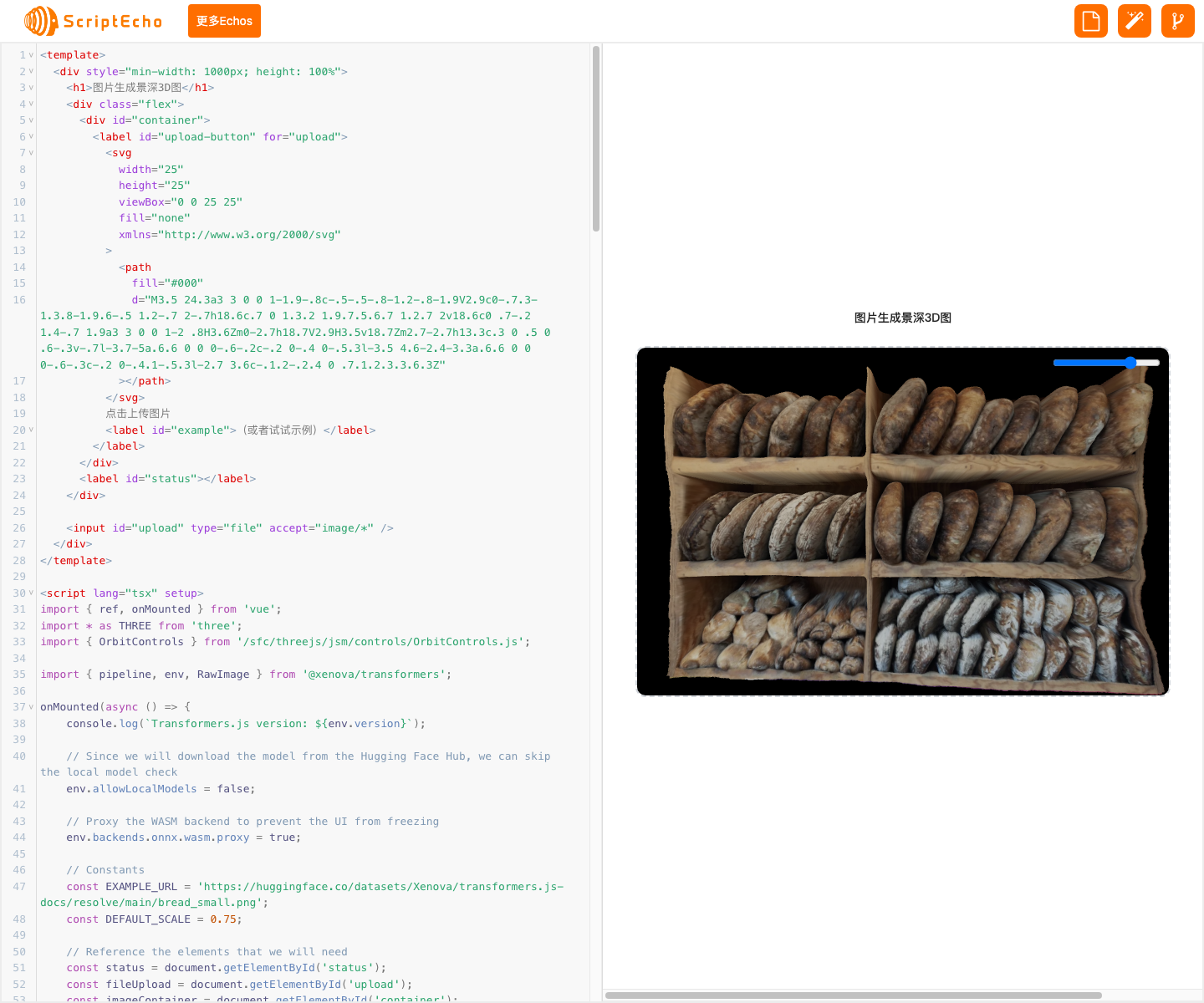
基于 Transformers.js 的图片景深 3D 图生成
应用场景
本代码可以将一张普通的图片转换为具有景深效果的 3D 图,可用于创建逼真的 3D 场景或增强图片的视觉吸引力。
代码基本功能
该代码使用 Transformers.js 中的深度估计模型,分析图片中物体的深度信息,并生成一张位移贴图。然后将位移贴图应用于 3D 模型,使其产生景深效果。用户可以通过滑动条控制景深程度,呈现出更具立体感和真实感的图像。
功能实现步骤及关键代码分析
1. 导入依赖项
import { ref, onMounted } from 'vue'; import * as THREE from 'three'; import { OrbitControls } from '/sfc/threejs/jsm/controls/OrbitControls.js'; import { pipeline, env, RawImage } from '@xenova/transformers'; - 导入 Vue.js 依赖项、Three.js 库、OrbitControls 控件和 Transformers.js 库。
2. 初始化状态和引用
onMounted(async () => { console.log(`Transformers.js version: ${env.version}`); // Since we will download the model from the Hugging Face Hub, we can skip the local model check env.allowLocalModels = false; // Proxy the WASM backend to prevent the UI from freezing env.backends.onnx.wasm.proxy = true; // Constants const EXAMPLE_URL = 'https://huggingface.co/datasets/Xenova/transformers.js-docs/resolve/main/bread_small.png'; const DEFAULT_SCALE = 0.75; // Reference the elements that we will need const status = document.getElementById('status'); const fileUpload = document.getElementById('upload'); const imageCOntainer= document.getElementById('container'); const example = document.getElementById('example'); console.log(`status: `, status) // Create a new depth-estimation pipeline status.textCOntent= '正在加载模型...'; const depth_estimator = await pipeline('depth-estimation', 'Xenova/depth-anything-small-hf'); status.textCOntent= '已完成'; - 禁用本地模型检查,因为我们将从 Hugging Face Hub 下载模型。
- 设置 WASM 后端代理,以防止 UI 在模型加载时冻结。
- 定义常量,例如示例 URL 和默认景深比例。
- 引用 HTML 元素,例如状态文本、文件上传输入框、图片容器和示例链接。
- 创建一个深度估计管道,该管道将用于分析图片的深度信息。
3. 设置事件监听器
example.addEventListener('click', (e) => { e.preventDefault(); predict(EXAMPLE_URL); }); fileUpload.addEventListener('change', function (e) { const file = e.target.files[0]; if (!file) { return; } const reader = new FileReader(); // Set up a callback when the file is loaded reader.Onload= e2 => predict(e2.target.result); reader.readAsDataURL(file); }); - 为示例链接添加一个点击事件监听器,以便用户可以加载示例图片。
- 为文件上传输入框添加一个更改事件监听器,以便用户可以选择要转换的图片。
4. 预测深度图
async function predict(url) { imageContainer.innerHTML = ''; const image = await RawImage.fromURL(url); // Set up scene and slider controls const { canvas, setDisplacementMap } = setupScene(url, image.width, image.height); imageContainer.append(canvas); status.textCOntent= '正在分析...'; const { depth } = await depth_estimator(image); setDisplacementMap(depth.toCanvas()); status.textCOntent= ''; // Add slider control const slider = document.createElement('input'); slider.type = 'range'; slider.min = 0; slider.max = 1; slider.step = 0.01; slider.addEventListener('input', (e) => { onSliderChange(parseFloat(e.target.value)); }); slider.defaultValue = DEFAULT_SCALE; imageContainer.append(slider); } - 清空图片容器。
- 从给定的 URL 加载图片。
- 设置场景和滑块控件。
- 使用深度估计管道预测图片的深度图。
- 设置位移贴图。
- 添加一个滑块控件,允许用户控制景深程度。
5. 设置场景
function setupScene(url, w, h) { // Create new scene const canvas = document.createElement('canvas'); const width = canvas.width = imageContainer.offsetWidth; const height = canvas.height = imageContainer.offsetHeight; const scene = new THREE.Scene(); // Create camera and add it to the scene const camera = new THREE.PerspectiveCamera(30, width / height, 0.01, 10); camera.position.z = 2; scene.add(camera); const renderer = new THREE.WebGLRenderer({ canvas, antialias: true }); renderer.setSize(width, height); renderer.setPixelRatio(window.devicePixelRatio); // Add ambient light const light = new THREE.AmbientLight(0xffffff, 2); scene.add(light); // Load depth texture const image = new THREE.TextureLoader().load(url); image.colorSpace = THREE.SRGBColorSpace; const material = new THREE.MeshStandardMaterial({ map: image, side: THREE.DoubleSide, }); material.displacementScale = DEFAULT_SCALE; const setDisplacementMap = (canvas) => { material.displacementMap = new THREE.CanvasTexture(canvas); material.needsUpdate = true; } const setDisplacementScale = (scale) => { material.displacementScale = scale; material.needsUpdate = true; } OnSliderChange= setDisplacementScale; // Create plane and rescale it so that max(w, h) = 1 const [pw, ph] = w > h ? [1, h / w] : [w / h, 1]; const geometry = new THREE.PlaneGeometry(pw, ph, w, h); const plane = new THREE.Mesh(geometry, material); scene.add(plane); // Add orbit controls const cOntrols= new OrbitControls(camera, renderer.domElement); controls.enableDamping = true; renderer.setAnimationLoop(() => { renderer.render(scene, camera); controls.update(); }); window.addEventListener('resize', () => { const width = imageContainer.offsetWidth; const height = imageContainer.offsetHeight; camera.aspect = width / height; camera.updateProjectionMatrix(); renderer.setSize(width, height); }, false); return { canvas: renderer.domElement, setDisplacementMap, }; } - 创建一个新的场景、相机和渲染器。
- 添加环境光。
- 加载图片并将其设置为材质贴图。
- 创建一个平面并将其添加到场景中。
- 添加轨道控件以允许用户旋转和缩放场景。
- 设置动画循环以持续渲染场景。
- 设置窗口大小更改事件监听器。
总结与展望
这段代码成功实现了图片景深 3D 图的生成功能,展示了 Transformers.js 和 Three.js 的强大功能。
开发经验与收获:
- 学习了如何使用 Transformers.js 加载和使用深度估计模型。
- 熟悉了 Three.js 中的场景、相机、渲染器和材质的概念。
- 了解了如何使用 Three.js 创建交互式 3D 场景。
未来拓展与优化:
- 探索不同的深度估计模型,以获得更高的准确性和更逼真的效果。
- 添加其他功能,例如更改景深范围或应用不同类型的位移贴图。
- 优化代码以提高性能和响应速度。
- 集成到更广泛的应用程序中,例如图像编辑器或 3D 建模工具。
更多组件:
获取更多 Echos
本文由ScriptEcho平台提供技术支持
项目地址:传送门
扫码加入 AI 生成前端微信讨论群: 
No Comments Yet
 Select Language