{ "rules": [ { "category": "gfw", "upstream": "https://dns.****.xyz/google/query-dns" }, { "category": "tencent", "upstream": "119.29.29.29 119.28.28.28" }, { "category": "bytedance", "upstream":"180.184.1.1 180.184.2.2" }, { "category": "alibaba", "upstream":"223.5.5.5 223.6.6.6" }, { "category": "baidu", "upstream":"180.76.76.76" } ], "default_upstream": [ "https://***-adh.alidns.com/dns-query", "tls://***-adh.alidns.com", "120.*.*.*", "121.*.*.*" ] } 对 geosite 进行解包。
gfwlist 用 cf 转发 googledns 查询
腾讯系,字节系,阿里系,百度系分别用自家的 dns 查询
其他(缺省) dns 采用阿里和腾讯家的个人免费版查询
所以现在免费情况下,cloudns 是无法托管到 cloudflare 了吗?
]]>https://zhul.in/2025/11/25/did-your-tld-slowing-down-your-site/
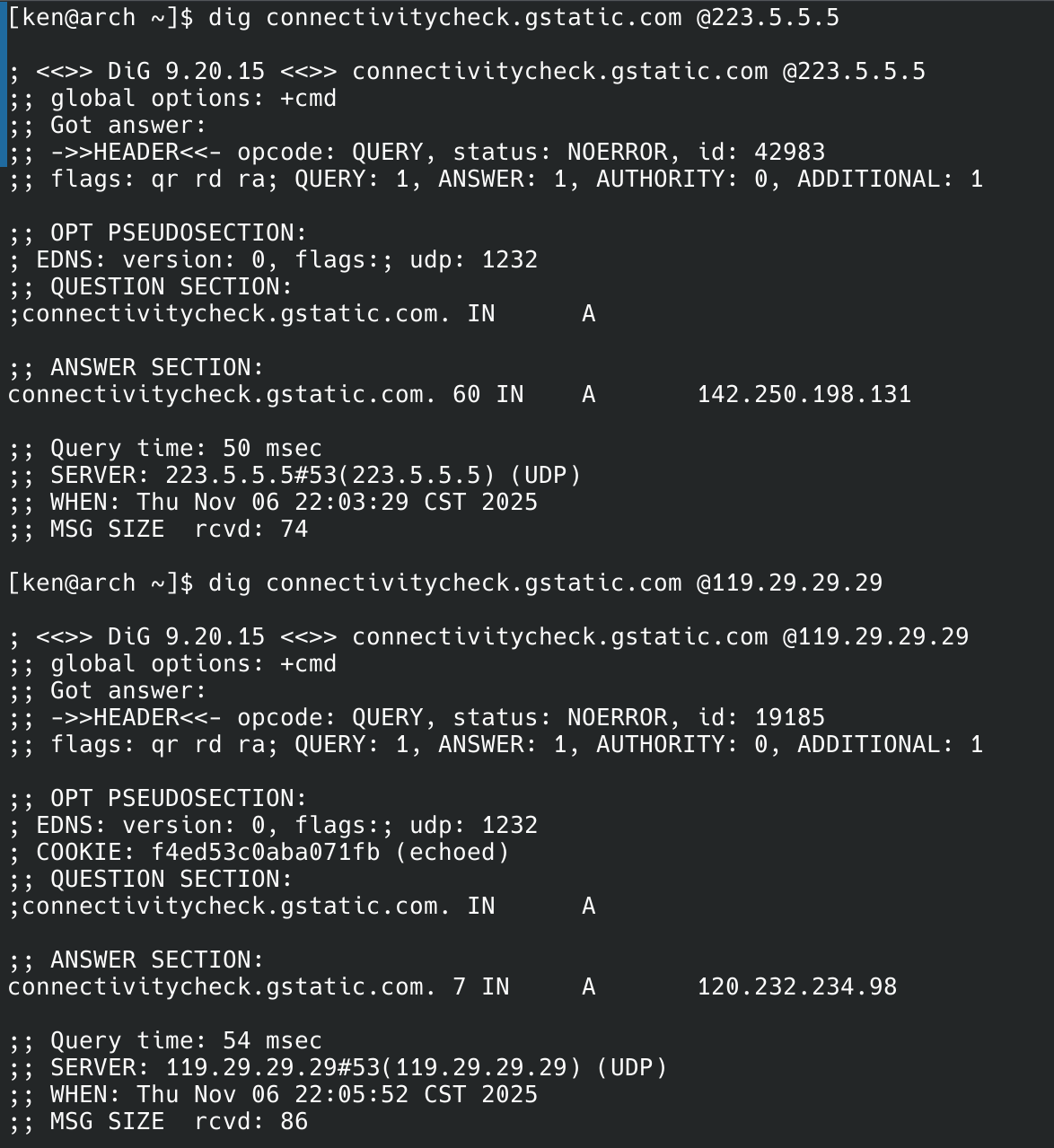
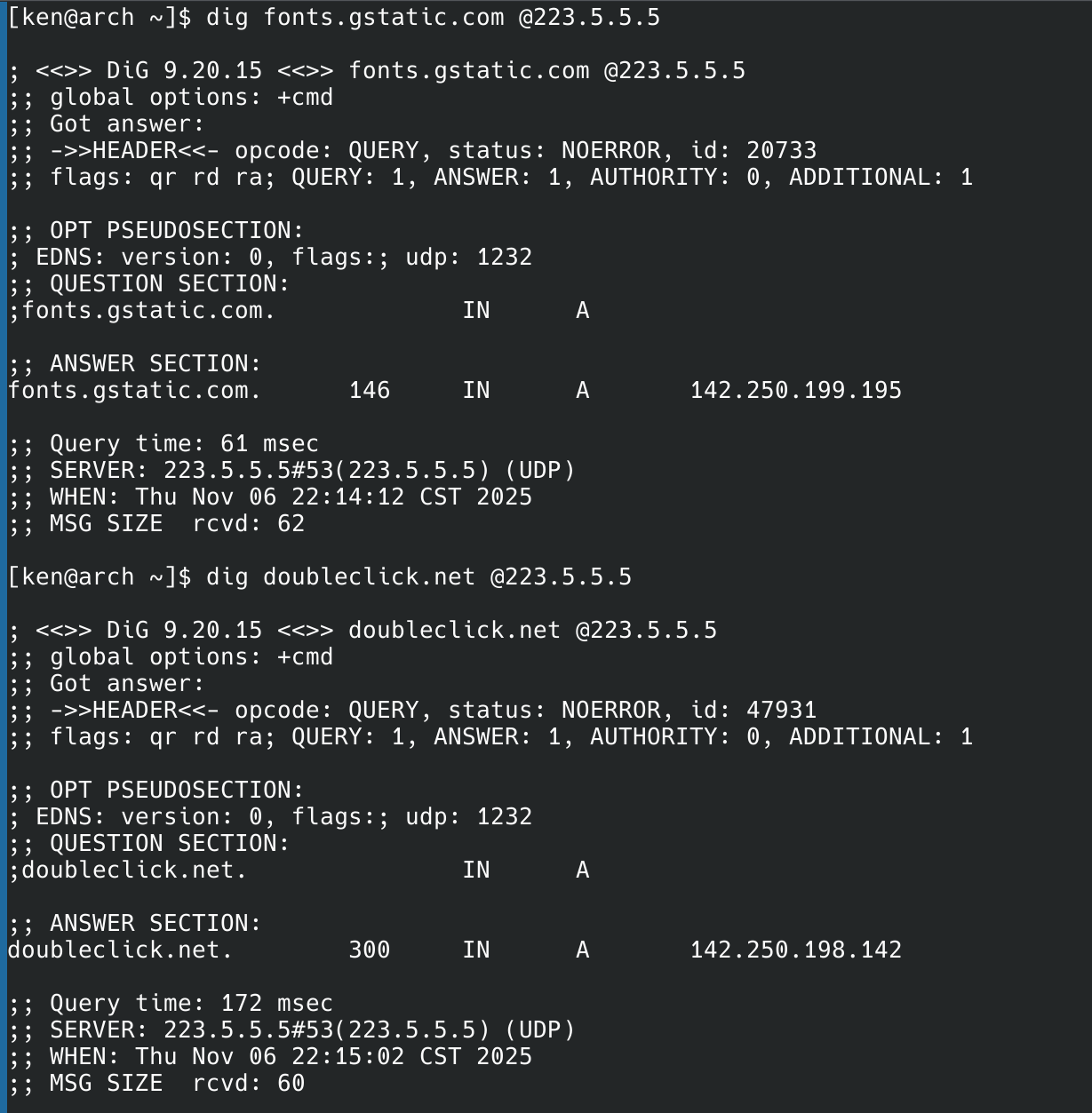
]]>223.5.5.5 和 223.6.6.6 解析connectivitycheck.gstatic.com 域名连接超时,在 Ruleset 中搜索果然发现有这个域名,手动 dig 查询试试:
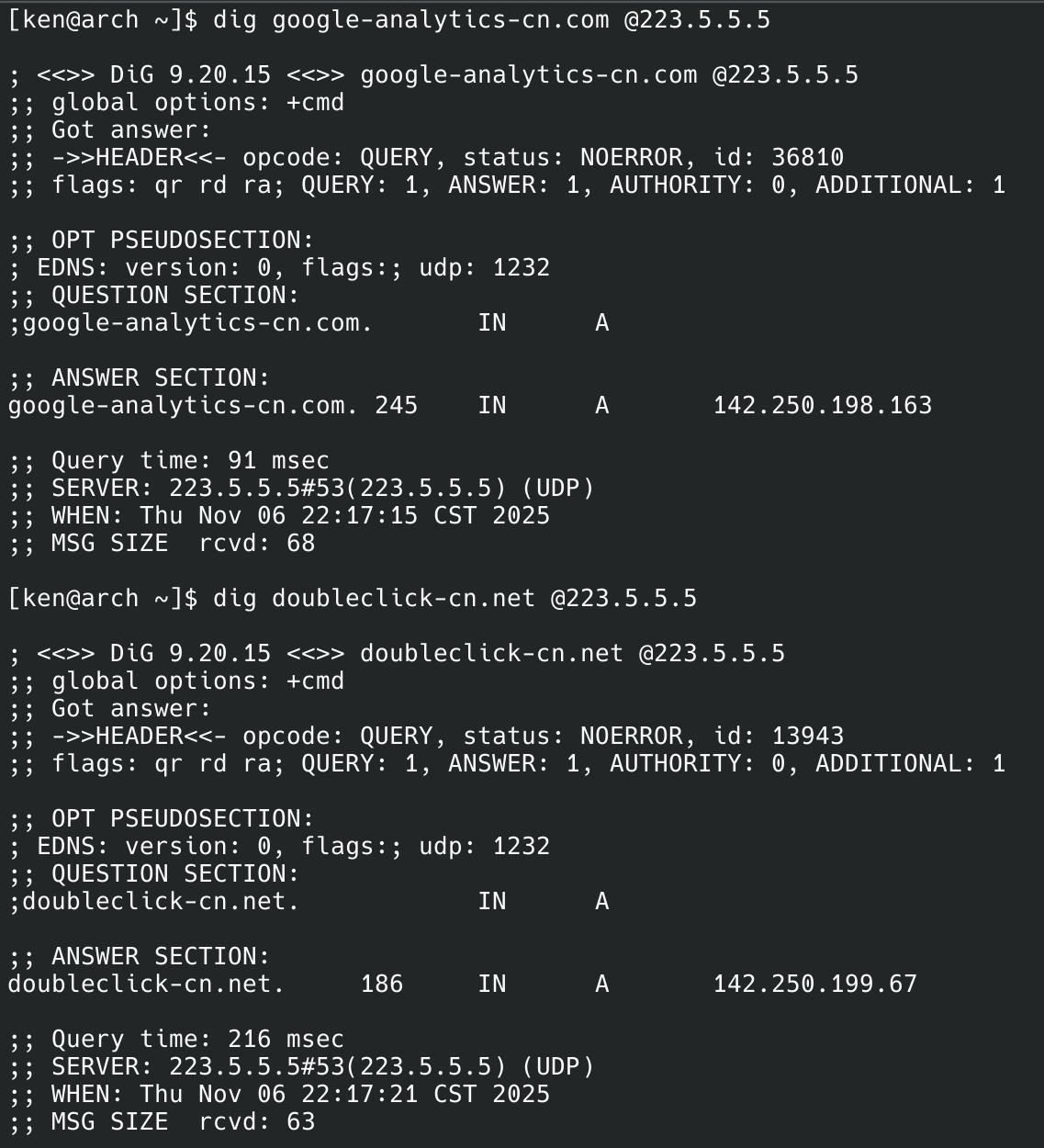
142.250.0.0/16 这个 IP 段已被墙,自然无法直连。

cn 后缀的域名也解析到了境外,何意位?更关键的一点是,它的分区解析似乎对非原生 IP 的 VPS 支持不太好,经常会被解析到奇怪的地区,IP 库的更新也非常不及时。举个例子:我在 itdog 里特意设置了让新加坡服务器解析到菲律宾节点,但它依然跑去了美国节点。
在部分日本或者香港的 vps 上 ping 域名会被认为在美国。

当前存在的问题是,去年使用的是华为云自建的,一切工作正常,今年到期后换了腾讯云,但是发现解析的腾讯相关服务存在问题,我要如何定位问题?当前是将部分腾讯域名使用公共 DNS 进行解析了,但是不知道问题在哪儿,此外我的问题还有,如何判断云服务商提供的内网 DNS 可以按照预期工作?如何测试云服务商提供的内网 DNS 支持 EDNS/DNSSEC 等?是否有自建 DNS 的最佳实践分享一下?
当前的自建 DNS 结构如下:
DoT(谷歌/Cloudflare)[新加坡]-->DoQ (白名单访问/分流列表/广告过滤)[国内云服务商]-->DoT/DoH (国内终端设备)
]]>手机的规则是没有泄漏的,但不能应用到路由的 shellcrash ,有哪位能提供一个没有泄漏 dns 的规则吗?
]]>除国内的网站加载较为缓慢之外,其余那些封锁措施较为轻微的网站可以直接访问
例如:V2EX Discord E-Hentai ExHentai
封锁措施较为严格的网站会直接显示:ERR_CONNECTION_RESET
例如:Pixiv
部分正常网站开始无法访问
例如:Github以及Steam
均显示ERR_CONNECTION_TIMED_OUT
此时在 Chrome 设置中关闭使用安全 DNS 则恢复正常,以上两个网站可以正常加载访问.
能够以牺牲一部分访问和加载速度为前提,换取更高的访问能力
问题来了:该如何对以上问题进行排查和解决?
希望获得解答
测试以上内容时,网关和客户端均无任何代理设置,且在 Windows 网络适配器中关闭 ipv6 协议仍能得到以上结果
]]>
755 地区,联通宽带,不需要代理能用的远程 DoT ,试了下好像只剩 1.1.1.1 ,8.8.8.8 反正是用不了
之所以不用代理,是 OpenClash 节点的域名解析变动相当频繁,而且还不能使用国内的 DNS 做解析,只有用国外 DNS 才能解析出正确结果,不知道是缓存问题还是故意被屏蔽了
有没有不需要代理能用的 DoT 、DoH 推荐
]]>通过 dig +short TXT whoami.ds.akahelp.net @ip 进行测试,测试用户无 ecs ip 字段时,public DNS 对 ecs 字段的添加,以及添加的内容;
通过 dig A www.tencent.com +subnet=x.x.x.x/x @ip 进行测试;这里的 subnet 选择属于不同运营商的 ip 地址(电信 203.189.113.0/24 ,移动 203.100.86.0/24 ,联通 210.82.251.0/24 ),查看他们返回的资源记录是否相同;
| public DNS 地址 | public DNS 提供商 | ecs 主动添加(测试 1 ) | ecs 解析支持(测试 2 ) |
|---|---|---|---|
| 114.114.114.114 | 114 DNS | 不添加 | 不支持 |
| 223.5.5.5 | 阿里 DNS | 不添加 | 支持 |
| 119.29.29.29 | 腾讯 DNS | 截断为 24 添加 | 支持 |
| 180.184.1.1 | 字节 DNS | 不截断添加 | 支持 |
| 180.76.76.76 | 百度 DNS | 不添加 | 支持 |
| 219.141.136.10 | 北京电信 DNS | 不添加 | 不支持 |
| 123.123.123.123 | 北京联通 DNS | 不添加 | 不支持 |
| 221.130.33.52 | 北京移动 DNS | 不添加 | 不支持 |
| 117.50.11.11 | OneDNS | 不添加 | 不支持 |
| 9.9.9.12 | IBM Quad9 DNS | 截断为 24 添加 | 支持 |
| 8.8.8.8 | Google DNS | 截断为 24 添加 | 支持 |
| 1.1.1.1 | Cloudflare DNS | 截断为 16 添加 | 不支持(中国运营商网段) |
我大概统计了当前主流网站他们的权威 DNS 服务器对于 ecs 字段的支持情况,有参考意义的是国内节点的,包括几家主流的互联网公司的门户网站,测试得到结果如下:
固定返回 scope_mask 为 24 的公司:tencent.com 、alibaba.com 、bytedance.com 、cloudflare.com ;(字节托管阿里云)
固定返回 scope_mask 为 0 的公司:baidu.com 、huawei.com 、jd.com 、microsoft.com 、amazon.com ;
返回的 scope_mask 直接复制 source_mask 复制的公司:netflix.com ;
按照匹配到的网段返回的公司:meituan.com 、pinduoduo.com 、kuaishou.com ;(这几家都托管到 DNSPod )
不返回 ecs 字段:didiglobal.com 、google.com 、youtube.com ;
如果匹配到网段返回网段,没有匹配到的话 scope_mask 直接复制 source_mask:iqiyi.com ;
最近在研究不同网站 DNS 对 ECS 字段的响应策略,发现国内大厂的处理方式差异还挺明显的,比如腾讯、阿里这类会固定返回/24 的 scope_mask ,百度、华为则返回/0 ,还有美团、拼多多这些用 DNSPod 托管的域名,默认匹配不到时会返回/17 。
有点好奇,现在运营商子网划分有时候挺细的,那像腾讯、阿里这种固定/24 的策略,会不会让部分用户拿到不太精准的解析结果?另外 DNSPod 选/17 作为兜底粒度,在缓存效率和解析精准度之间,这种平衡方式会不会存在什么潜在问题?大家对这些不同策略的有什么看法
]]>C:\Users\dima>q doh.pub /s 223.5.5.5 /verbose time="2025-09-05T09:18:32+08:00" level=debug msg="Name: doh.pub" time="2025-09-05T09:18:32+08:00" level=debug msg="RR types: [AAAA NS MX TXT CNAME A]" time="2025-09-05T09:18:32+08:00" level=debug msg="Server(s): [223.5.5.5]" time="2025-09-05T09:18:32+08:00" level=debug msg="Using server 223.5.5.5:53 with transport plain" time="2025-09-05T09:18:32+08:00" level=debug msg="Using UDP with TCP fallback: 223.5.5.5:53" doh.pub. 1m15s A 1.12.12.21 doh.pub. 1m15s A 120.53.53.53 doh.pub. 37m28s NS ns3.dnsv5.com. doh.pub. 37m28s NS ns4.dnsv5.com. doh.pub. 10m TXT "15bb0u0le1vyvo1mfjhufzuewzafdqmy" C:\Users\dima>q doh.pub /s https://1.12.12.21/dns-query /verbose time="2025-09-05T09:20:12+08:00" level=debug msg="Name: doh.pub" time="2025-09-05T09:20:12+08:00" level=debug msg="RR types: [A AAAA NS MX TXT CNAME]" time="2025-09-05T09:20:12+08:00" level=debug msg="Server(s): [https://1.12.12.21/dns-query]" time="2025-09-05T09:20:12+08:00" level=debug msg="Using server https://1.12.12.21:443/dns-query with transport http" time="2025-09-05T09:20:12+08:00" level=debug msg="Using HTTP(s) transport: https://1.12.12.21:443/dns-query" time="2025-09-05T09:20:12+08:00" level=debug msg="[http] sending GET request to https://1.12.12.21:443/dns-query?dns=3AQBAAABAAAAAAAAA2RvaANwdWIAAA8AAQ" time="2025-09-05T09:20:12+08:00" level=fatal msg="requesting https://1.12.12.21:443/dns-query?dns=3AQBAAABAAAAAAAAA2RvaANwdWIAAA8AAQ: Get \"https://1.12.12.21:443/dns-query?dns=3AQBAAABAAAAAAAAA2RvaANwdWIAAA8AAQ\": tls: failed to verify certificate: x509: certificate is valid for 120.53.53.53, 1.12.12.12, 119.28.28.87, 119.28.28.89, 119.28.28.91, 119.28.28.93, 119.28.28.95, 119.28.28.97, 119.28.28.99, 119.29.29.87, 119.29.29.89, 119.29.29.91, 119.29.29.93, 119.29.29.95, 119.29.29.97, 119.29.29.99, not 1.12.12.21" ]]>doggo www.youtube.com @udp://123.123.123.123 NAME TYPE CLASS TTL ADDRESS NAMESERVER youtube-ui.l.google.com. A IN 1s 142.250.71.206 123.123.123.123:53 youtube-ui.l.google.com. A IN 1s 142.250.199.238 114.114.114.114:53
]]>经过一番排查和实验,总结出这些应对方法。
iptables -t nat -A prerouting_lan_rule -m mac --mac-source <手机 MAC> -p udp -d 114.114.114.114 --dport 53 -j DNAT --to-destination 192.168.X.1 iptables -t nat -A prerouting_lan_rule -m mac --mac-source <手机 MAC> -p tcp -d 114.114.114.114 --dport 53 -j DNAT --to-destination 192.168.X.1 (最无感
(不喜欢 VPN 通道被占用
一开始以为是 overlay 配置,结果 cmd overlay 验证并不涉及 DNS 。 抓 dumpsys connectivity ,确认是 ClientModeImpl 里往 LinkProperties 里强加的。 最终在 /apex/com.android.wifi/javalib/service-wifi.jar 找到关键方法:addBackupDnsServerIfNeeded()。
(治标
iptables -I OUTPUT -d 114.114.114.114 -p udp --dport 53 -j REJECT iptables -I OUTPUT -d 114.114.114.114 -p tcp --dport 53 -j REJECT (治本
罪魁祸首↓
private void addBackupDnsServerIfNeeded() { Iterator<InetAddress> it = this.mLinkProperties.getDnsServers().iterator(); int i = 0; while (it.hasNext()) { if (it.next() instanceof Inet4Address) { i++; } } if (i == 1) { try { this.mLinkProperties.addDnsServer(InetAddress.getByName("114.114.114.114")); } catch (UnknownHostException unused) { if (this.mVerboseLoggingEnabled) { log("Adding 114 DNS Server Fails"); } } } } AOSP 已经有 Fallback 机制了,在无任何可用 DNS 时才会追加 8.8.8.8 。 小米、一加、Moto 搞这种骚操作,看似提升了小白的网络体验,实际上剥夺了用户选择权,都是傻*
]]>支持监听与请求以下类型的 DNS:
项目地址: https://github.com/pmkol/mosdns-x
由于原版 mosdns 在 v5 版本砍掉了一些功能,更适合在路由器等内网家用场景下使用,导致很多用户选择停留在 v4 版本,这也是我之前写的 EasyMosdns 项目仅支持 v4 的原因。
其实从 EasyMosdns 的星数就能看出 mosdns v4 的用户量,同时我也是 mosdns 最大的用户,第一个做到过亿日请求量的,所以经验积累会更丰富一些,而 v4 版本原作者已不再维护,所以决定在 v4 版本上做出一些迭代,并开源成果。
Mosdns-x 基于 mosdns v4.5.3 进行了以下升级改进:
希望能给 mosdns 的用户们带来帮助 : )
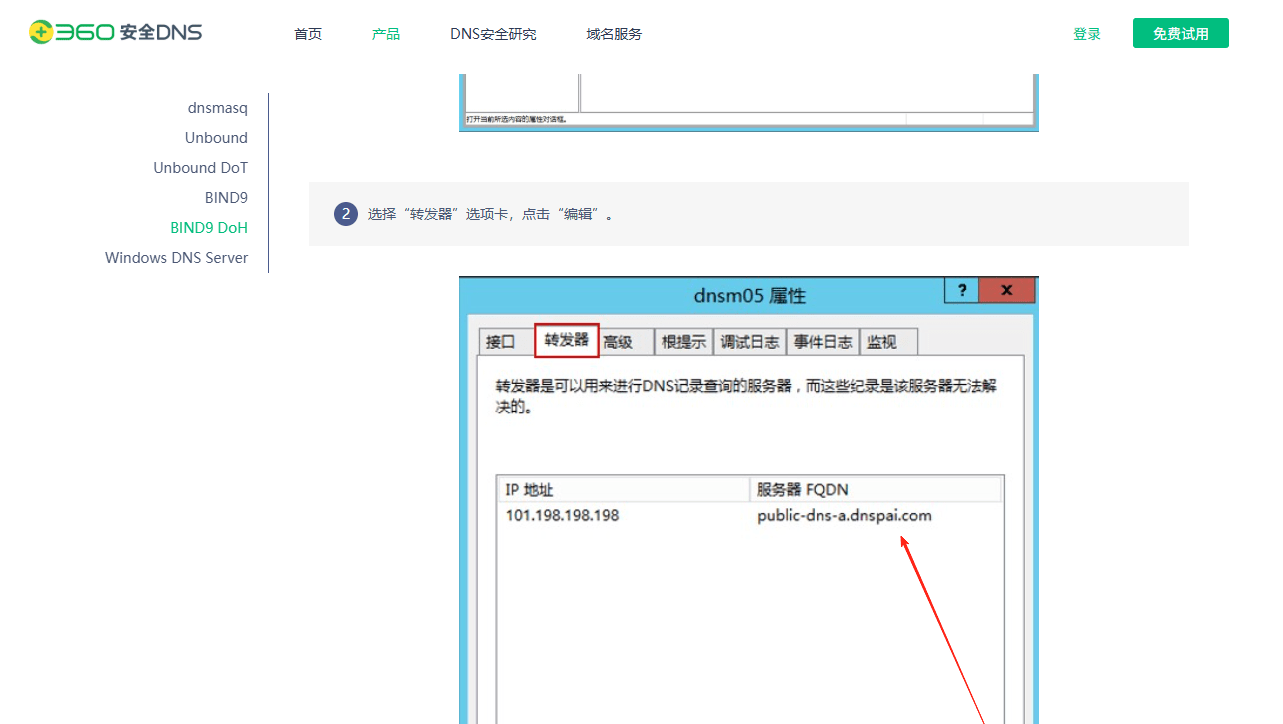
]]>今天看了下 360 也有加密的 dns ,收的 dnspai ? 
dns 派搜不到了,印象中是有这么个页面 
Domain Name: 44f0fa23371825f950eca1601b3103f28015adcc64a70a1c7e1ec468801105c.link Registry Domain ID: DO_0b12b1ca8376e82e7f8629855c62b912-UR Registrar WHOIS Server: whois.registrar.amazon Registrar URL: http://registrar.amazon.com Updated Date: 2025-08-04T11:03:55.431Z Creation Date: 2025-08-04T10:53:19.253Z Registry Expiry Date: 2026-08-04T10:53:19.253Z Registrar: Amazon Registrar, Inc. Registrar IANA ID: 468 Registrar Abuse Contact Email: trustandsafety@support.aws.com Registrar Abuse Contact Phone: +1.2024422253 Domain Status: addPeriod https://icann.org/epp#addPeriod 这种可以一眼认定为恶意域名么
]]>在国内买了一个,未备案无法解析 DNS,然后转移到 Name 后半年了,也无法正常解析.
是不是被标记了为未备案国内域名了...
还有救吗 (╥﹏╥)
]]>想问问 IOS 上有没有类似 MosDNS 这样的工具?
]]>-- 定义 DNSNameSet 集合 local activeSets = { shuntset = newDNSNameSet(), adblocking = newDNSNameSet(), adblockingwhite = newDNSNameSet(), malicious = newDNSNameSet() } local standbySets = { shuntset = newDNSNameSet(), adblocking = newDNSNameSet(), adblockingwhite = newDNSNameSet(), malicious = newDNSNameSet() } local lastLoadDate = nil -- 上次重载的日期 -- 辅助函数:批量加载域名到集合 local function batchLoadDomains(filename, set) set:clear() local count = 0 local file = io.open(filename, "r") if not file then infolog("Unable to open file: " .. filename) return false, count end local cOntent= file:read("*a") file:close() for line in content:gmatch("[^\r\n]+") do local trimmed_line = line:match("^%s*(.-)%s*$") if trimmed_line and trimmed_line ~= "" then set:add(newDNSName(trimmed_line)) count = count + 1 end end return true, count end -- 加载域名集合 local function reloadDomainSets() infolog("Reloading domain lists at " .. os.date("%Y-%m-%d %H:%M:%S")) local shuntSuccess, shuntCount = batchLoadDomains("/etc/dnsdist/domains.txt", standbySets.shuntset) local adSuccess, adCount = batchLoadDomains("/etc/dnsdist/anti-ad-domains.txt", standbySets.adblocking) local whiteSuccess, whiteCount = batchLoadDomains("/etc/dnsdist/anti-ad-white-list.txt", standbySets.adblockingwhite) local maliciousSuccess, maliciousCount = batchLoadDomains("/etc/dnsdist/malicious-domains.txt", standbySets.malicious) if shuntSuccess and adSuccess and whiteSuccess and maliciousSuccess and not standbySets.shuntset:empty() and not standbySets.adblocking:empty() then activeSets.shuntset, standbySets.shuntset = standbySets.shuntset, activeSets.shuntset activeSets.adblocking, standbySets.adblocking = standbySets.adblocking, activeSets.adblocking activeSets.adblockingwhite, standbySets.adblockingwhite = standbySets.adblockingwhite, activeSets.adblockingwhite activeSets.malicious, standbySets.malicious = standbySets.malicious, activeSets.malicious lastLoadDate = os.date("%Y-%m-%d") infolog(string.format("Reload completed: Shunt=%d, Ad=%d, White=%d, Malicious=%d", shuntCount, adCount, whiteCount, maliciousCount)) return true end infolog("Domain lists reload failed") return false end -- 主要 DNS 处理规则 function luarule(dq) local domain_str = dq.qname:toStringNoDot() local primary_domain = domain_str:match("([^.]+%.[^.]+)$") if not primary_domain then return DNSAction.Pool, "china" end local domain = newDNSName(domain_str) local primarydomain = newDNSName(primary_domain) if activeSets.malicious:check(domain) or activeSets.malicious:check(primarydomain) then infolog("Blocked malicious domain: " .. domain_str) return DNSAction.Refused end if activeSets.adblocking:check(domain) then if activeSets.adblockingwhite:check(domain) then if activeSets.shuntset:check(domain) or activeSets.shuntset:check(primarydomain) then return DNSAction.Pool, "china" end return DNSAction.Pool, "default" end return DNSAction.Refused end if activeSets.shuntset:check(domain) or activeSets.shuntset:check(primarydomain) then return DNSAction.Pool, "china" end return DNSAction.Pool, "default" end -- 定时任务:每天 4:40 执行 function maintenance() local currentTime = os.time() local currentHour = tonumber(os.date("%H", currentTime)) local currentMinute = tonumber(os.date("%M", currentTime)) local currentDate = os.date("%Y-%m-%d") -- 检查当前时间是否为 4:40 ,并确保今天未执行过 if currentHour == 4 and currentMinute == 40 and lastLoadDate ~= currentDate then local success = reloadDomainSets() if not success then infolog("Scheduled reload at 4:40 failed.") end end end -- 初始加载 reloadDomainSets() 下面是 shell 脚本生成上述所要用到的文件;规则包含分流、广告拦截、广告拦截白名单和恶意域名列表
#!/bin/bash cd /root/china rm -f i*.txt rm -f tmp*.txt wget -O i1.txt https://raw.githubusercontent.com/felixonmars/dnsmasq-china-list/master/accelerated-domains.china.conf wget -O i2.txt https://raw.githubusercontent.com/Loyalsoldier/v2ray-rules-dat/release/apple-cn.txt wget -O i3.txt https://raw.githubusercontent.com/privacy-protection-tools/anti-AD/master/anti-ad-domains.txt wget -O i4.txt https://raw.githubusercontent.com/privacy-protection-tools/dead-horse/master/anti-ad-white-list.txt wget -O i5.txt https://raw.githubusercontent.com/elliotwutingfeng/USOM-Blocklists/refs/heads/main/urls.txt wget -O i6.txt https://raw.githubusercontent.com/elliotwutingfeng/Inversion-DNSBL-Blocklists/refs/heads/main/Google_hostnames.txt wget -O i7.txt https://raw.githubusercontent.com/elliotwutingfeng/ChongLuaDao-Phishing-Blocklist/refs/heads/main/urls.txt echo >> i5.txt echo >> i6.txt echo >> i7.txt cat i5.txt i6.txt i7.txt >> tmp2.txt sed '/\//d' tmp2.txt > file_filtered.txt sed 's/:[0-9]*//g' file_filtered.txt > file_filtereds.txt awk '!seen[$0]++' file_filtereds.txt > malicious-domains.txt cat i1.txt | grep -E -v "^#" > tmp1.txt sed -i s'/server=\//\//g' tmp1.txt sed -i s'/\/114.114.114.114//g' tmp1.txt sed -i s'/full:/\//g' i2.txt cat zdy.dd i2.txt tmp1.txt > tump.txt sed -i s'/^\///g' tump.txt sed -i '/^#/d' i3.txt sed -i '/^#/d' i4.txt mv tump.txt /etc/dnsdist/domains.txt mv i3.txt /etc/dnsdist/anti-ad-domains.txt mv i4.txt /etc/dnsdist/anti-ad-white-list.txt mv malicious-domains.txt /etc/dnsdist/malicious-domains.txt rm -f i*.txt rm -f tmp*.txt rm -f file_*.txt 然后这个使用就是在/etc/dnsdist/dnsdist.conf 里面添加下面的内容
dofile("/etc/dnsdist/luarule.lua") addAction(AllRule(), LuaAction(luarule)) 把上面那段 lua 放在 dnsdist.conf 中也是可以的 dofile(“/etc/dnsdist/luarule.lua”)这行不加就行
其它内容自行读取 dnsdist 官方文档 https://dnsdist.org/
]]>addLocal("127.0.0.1:5200") newServer{address="127.0.0.1:5373", useClientSubnet=true,pool="china"} newServer({address="127.0.0.1:443", tls="openssl", subjectName="xxxx", dohPath="/dns-query", validateCertificates=true,pool="default",useClientSubnet=true}) local shuntset = newDNSNameSet() for line in io.lines("/etc/dnsdist/domains.txt") do local trimmed_line = line:match("^%s*(.-)%s*$") if trimmed_line ~= "" then shuntset:add(newDNSName(line)) end end function matchChinaDomain(qname,shuntset) local primary_domain = qname:toStringNoDot():match("([^.]+%.[^.]+)$") domain = newDNSName(qname:toStringNoDot()) -- infolog("Query domain: " .. qname:toStringNoDot()) -- infolog("Query domain: " .. primary_domain) if shuntset:check(domain) then return true else primarydomain = newDNSName(primary_domain) -- infolog("Exact match: " .. tostring(shuntset:check(primarydomain))) return shuntset:check(primarydomain) end end addAction(LuaRule( function(dq) return matchChinaDomain(dq.qname,shuntset) end ), PoolAction("china")) addAction(AllRule(), PoolAction("default")) 这是来自 /etc/dnsdist/dnsdist.conf dnsdist 的配置文件下面简单解释一下
下面是 shell 脚本用于生成 domains.txt 文件
#!/bin/bash cd /root/app/china rm -f i*.txt rm -f tmp*.txt wget -O i1.txt https://raw.githubusercontent.com/felixonmars/dnsmasq-china-list/master/accelerated-domains.china.conf wget -O i2.txt https://raw.githubusercontent.com/Loyalsoldier/v2ray-rules-dat/release/apple-cn.txt cat i1.txt | grep -E -v "^#" > tmp1.txt sed -i s'/server=\//\//g' tmp1.txt sed -i s'/\/114.114.114.114//g' tmp1.txt sed -i s'/full:/\//g' i2.txt cat zdy.dd i2.txt tmp1.txt > tump.txt sed -i s'/^\///g' tump.txt rm -f i*.txt mv tump.txt /etc/dnsdist/domains.txt zdy.dd 这个文件就是自定义的域名了虽然来自 github 的中国大陆的域名列表挺完善的但也有覆盖不到的
zdy.dd 里面的格式“/xxx.xx”,一行一个
当然 dnsdist 不仅仅只能实现基于域名分流还可以实现更多的功能(基于 ip 分流、基于 ip 和域名分流、基于恶意域名列表拦截、基于威胁情报 ip 源进行拦截、正则匹配拦截,改写 edns 、改写 dns 回复数据等等)
这个方案我用了很长一段时间和其它的有什么区别我不知道但是对比 adguardhome 的分流 dnsdist 无论是占用还是响应都比 adguardhome 快一些
最后我想知道如果做公益 dns 是否要加上广告拦截呢,我一直在纠结这个问题我目前做的是加上广告拦截的但是老是一堆反映这个怎么拦截不了这个被误杀了挺烦的毕竟每个人对这个东西需求不一样希望各位大佬给点建议
]]>就想自建,之前用 rust 写了一套完整的 DNS 解析,主要还是依靠上游服务商的公共 DNS
协议支持 TCP/UDP/DOT/DOH/DOH3/DNSCrypt/EDNS
问问大家付费这路子可行不,可行的话我明天就部署上,放出来试试抗压能力,
]]>opendns 直连的延迟: https://images.weserv.nl/?url=https://article.biliimg.com/bfs/new_dyn/b56511701fdaccbb63925acb7041307179547202.png
opendns 代理的延迟: https://images.weserv.nl/?url=https://article.biliimg.com/bfs/new_dyn/9a270a8aec8e880ec683f30538bdf0fa79547202.png
dnspod 直连的延迟: https://images.weserv.nl/?url=https://article.biliimg.com/bfs/new_dyn/fdfefe325e0b43654482f6cd553105a879547202.png
为什么 opendns 直连比代理还快?最低延迟居然去到 27ms
]]>后来我发现阿里 DNS 除了快以外毫无优点,主要问题如下:
基于以上理由,我现在已几乎弃用阿里公共 DNS ,仅将 223.5.5.5 / 223.6.6.6 和 119.29.9.29 共同作为查 DoH 域名或 DoH 不可用时的 fallback 选项。
*: 以往 GFW 只会将黑名单污染成国外 IP ,即使结果是错的也不影响分流效果;但没返回或返回国内 IP 就会有问题。
]]>阿里腾讯的 dns 返回的是同一个结果。但是 1248 返回的结果是另一个机房的,是可用的。域名很多,ip 也很多,手动重写配置不现实。
之前我用 adguard home 最快 ip 模式,把 1248 配置成备用。今天发现它的逻辑是主服务器不可用才用备用,并不是主服务器结果 ping 不了就用备用的。
想了解下有没有满足这个需求的,能支持检测结果可用性然后提供负载均衡的 dns 工具。
]]>目前极少数开源还在境内有节点的公益项目,重新上线了公益版分流 API/DoH 节点。
为防止滥用,已将基于 DoH 协议的分流 API 节点内置在项目中,禁止其它 DNS 客户端请求,从而大幅度提升境内节点的请求速度,让用户获得更好的体验。
如果懒得部署这个项目,还可以通过打赏项目的方式,参与测试无客户端限制的赞助版服务。
项目地址与更多说明请见 [ GitHub | Rules | Api(DoH) ]
发现很多用户是把这个分流节点当作公共 DoH 来用的,之前发布 3.0 版本时就有说明,这样只会对本地的站点的解析速度造成负优化,而且这个项目并没有提供公共解析服务,只是之前没有严格限制而已。
然而没有限制的结果就是滥用严重,各种敏感项目内置,各种敏感频道推荐用来解析敏感服务,至于被滥用到什么程度呢,公益服务下架两个多月了,下架的地址每天还有几千万次无效请求 : (
除了滥用外,有 DDOS 的、有用客户端错误请求到项目博客差点把日志刷爆的、有用来全局请求说服务慢的,甚至离谱到还有造谣作者以“DNS 泄露”为名引导用户使用服务的,而全网最详细的那篇“DNS 泄露的技术原理分析”就是作者本人写的,目的就是为了告诉用户不要太纠结某些 UP 主讲的 DNS 泄露 : )
原公益服务下架后,几乎所有的赞助用户都建议别搞公益服务了,因为费力不讨好。事实上,境内这些知名自建服务逐渐退场后,除了少数用户找到了一些私有服务外,这个项目的公益服务几乎承载了绝大部份境内流量,每日几亿的请求量,很多初创公司都做不到,而这只是个人维护的项目,最终还是选择了重新上架公益服务。
如果说 EasyMosdns 的 v3.0 版本引入了分流 API 理念,那么全新的 v3.5 版本就是将分流 API 合规化,通过限制其它 DNS 客户端请求的方式,规避“提供公共解析服务”的风险,让这个公益服务在境内合规的运行。毕竟初衷也是希望通过开源的方式,让更多用户通过闲置的服务器,帮助身边的人。
最后希望这个项目,能帮助到更多用户 ^_^
]]>
]]>